Reference
Logic Pro glossary
Logic Pro has its own vocabulary. These short definitions follow Apple's Logic Pro User Guide glossary, and each one links to the guide where the term matters most.
 Owen Hartley
Projects, tracks and regions
| Term | Meaning |
|---|---|
| Project | The Logic Pro file containing MIDI regions and references to the audio files it plays |
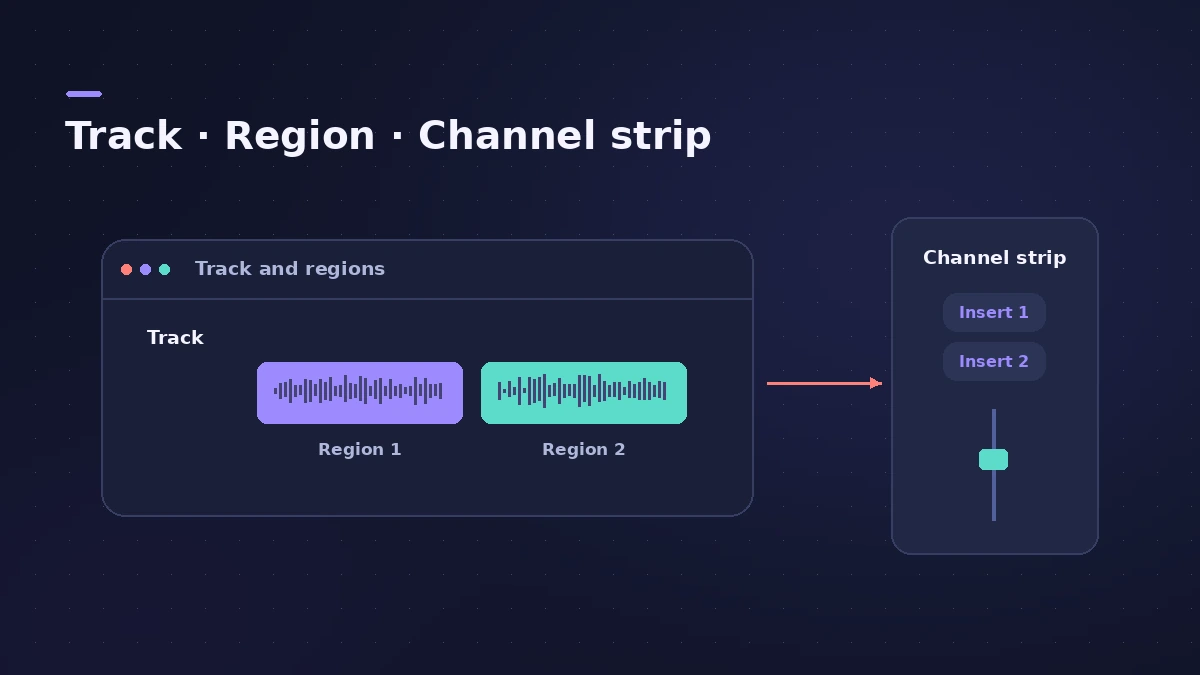
| Track | A horizontal row in the Tracks area holding regions; each routes to a channel strip |
| Tracks area | The main workspace for recording, editing and arranging regions |
| Region | A rectangular block of audio or MIDI data in the Tracks area |
| Alias | A pointer to a MIDI region that follows changes to the original |
| Playhead | The vertical line showing the current playback position |
| Cycle area | A section that plays repeatedly when Cycle mode is on |
Recording
| Term | Meaning |
|---|---|
| Take | A recording; you can record several without leaving record mode |
| Comping | Combining the best parts of several takes into one — see cycle recording and takes |
| Punch in | Entering record mode during playback to replace part of a recording |
| Latency | The short delay between playing a note and hearing it — see latency |
| Sample rate | How many times per second audio is sampled; Logic Pro supports 44.1 to 192 kHz |
Editing and timing
| Term | Meaning |
|---|---|
| Quantize | Moving notes to the nearest point on a grid, non-destructively |
| Flex editing | Editing the timing and pitch of notes in audio regions — see Flex Pitch |
| Smart Tempo | Lets Logic Pro adapt the tempo to a recording, or the recording to the tempo |
| Tempo | Playback speed in beats per minute, edited in the Tempo track |
| Velocity | How hard a MIDI note is struck |
Mixing and sound
| Term | Meaning |
|---|---|
| Channel strip | A virtual mixing console channel with mute, solo, volume and pan |
| Mixer | The area showing all channel strips, for levels, panning, plug-ins and routing |
| Bus | Routing that sends audio to aux channel strips for effects or submixing — see aux sends |
| Patch | Stored instrument, effect and routing settings for a track |
| Plug-in | Software that extends Logic Pro, typically an instrument or effect |
| Smart Controls | Onscreen controls for the selected track's key parameters |
| Automation | Recording and playing back changes to controls over time — see automation |
| Normalize | Raising an audio file to the maximum level without changing its dynamics |
Rendering and files
| Term | Meaning |
|---|---|
| Bounce | Rendering regions with their effects into an audio file — see bounce |
| Freeze | Offline bouncing of tracks to save processing power |
| Audio file | A sound recording on disk; Logic Pro stores AIFF, WAVE and CAF |
| ALAC | Apple Lossless Audio Codec, lossless compression |
| Apple Loops | Tagged audio or MIDI loops found in the Browser — see Apple Loops |
| Audio Units | The standard macOS plug-in format for effects and instruments |
Session Players
| Term | Meaning |
|---|---|
| Session Player | Virtual bass, keyboard and drum players added through Session Player regions — see Session Players |
Sources
- Apple — Logic Pro User Guide for Mac: Glossary
- Apple — Logic Pro User Guide for Mac: Glossary (AAF, Apple Loops, AMS)
Checked November 2026. Logic ProFiles is independent of Apple; menu names can differ slightly between Logic Pro versions.
Frequently asked questions
What's the difference between a track and a region?
+
A track is a horizontal row in the Tracks area; regions are the blocks of audio or MIDI placed on it.
What does bounce mean in Logic Pro?
+
Rendering regions, with their effects, into an audio file — in real time or offline.
Related
- Middle C in Logic Pro: C3 or C4?Why Logic Pro can label middle C as C3 or C4, what MIDI note 60 is, how the Yamaha and Roland conventions differ, and where to switch the display.
- Region types in Logic ProEvery region type in Logic Pro: audio, MIDI, pattern and Session Player regions, aliases, take folders, folders and Apple Loops — and what each holds.
- Note to frequency calculatorFind the frequency of any note with your own A4 reference, its MIDI note number, and the nearest note and cents for any frequency — for EQ and tuning.
- Logic Pro signal flow explainedHow audio flows through a Logic Pro channel strip: insert effects in series, sends over buses to aux channels, pre-fader, post-fader and post-pan sends.
- File formats Logic Pro supportsWhich file formats Logic Pro plays, records and bounces: AIFF, WAV (BWF), CAF, Apple Lossless, MP3, AAC, plus MIDI, AAF, Final Cut Pro XML and MusicXML.
- Logic Pro shortcuts — the default key commands worth learningThe Logic Pro key commands worth learning first: transport, recording, windows, editing, tracks and export from Apple's U.S. preset, and how to change them.
- The Logic Pro interface explainedA tour of the Logic Pro window: control bar and LCD, Tracks area, inspector, Library, Browser, Mixer, editors and Smart Controls, with keys to toggle them.
- Logic Pro referenceLogic Pro reference: a plain-English glossary, supported audio and MIDI file formats, where plug-ins are installed, and how to make custom key commands.