Mixing
Gain staging in Logic Pro
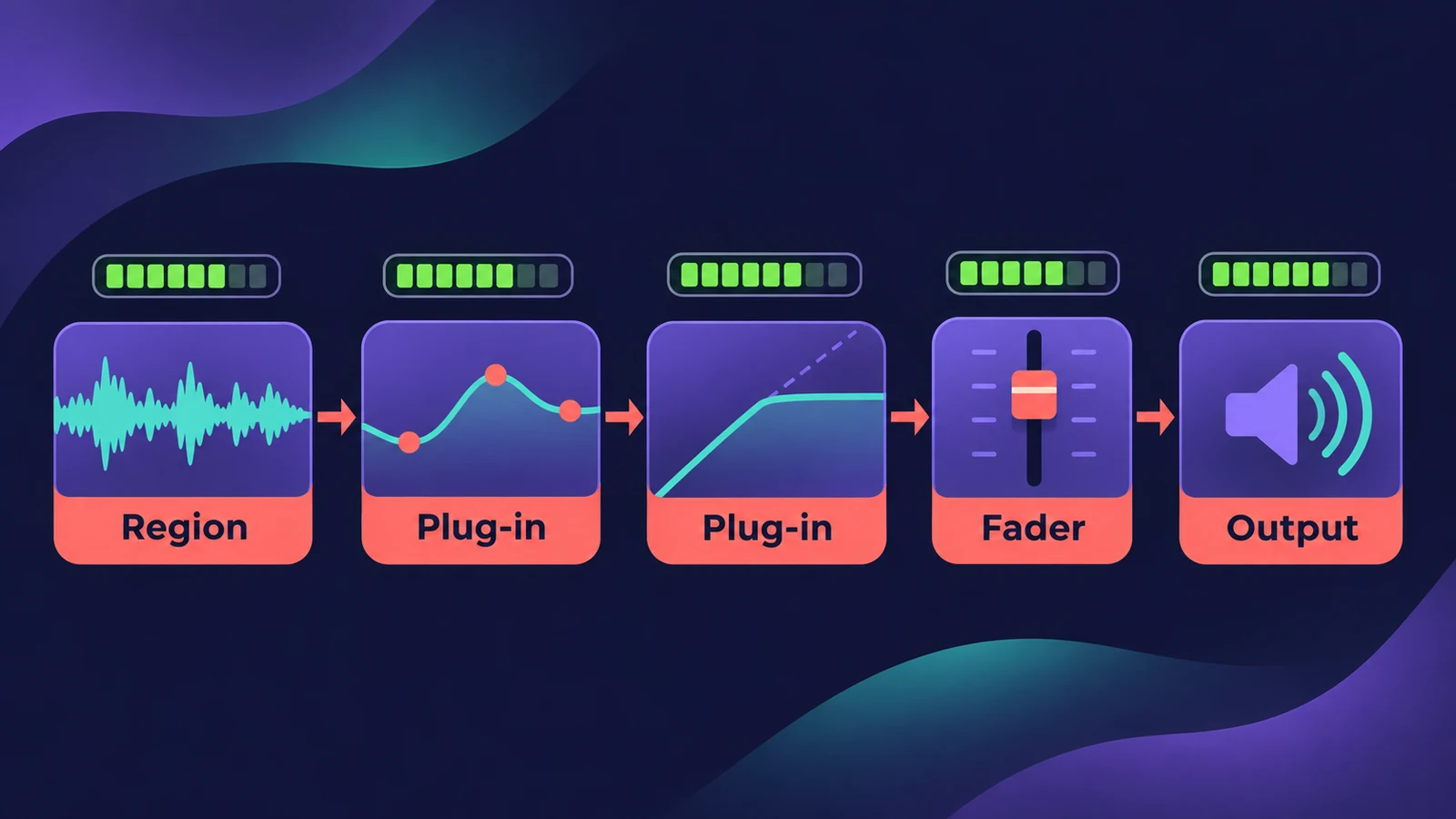
Gain staging means keeping sensible levels at every step — region, plug-ins, fader, buses, output. Logic Pro's meters show levels after the fader by default, so turning on pre-fader metering is the first step to seeing what each track really sends into its plug-ins.
 Owen Hartley
Where to find it
Control bar > Pre-Fader Metering
Where to set level
| Stage | Tool |
|---|---|
| Source | Region gain, Normalize Region Gain, Gain plug-in |
| Plug-ins | Input/output controls inside each plug-in |
| Balance | Channel faders |
| Groups | Aux buses and VCA faders |
| Output | Stereo Out — keep clear of clipping |
Step by step
-
1
Turn on pre-fader metering
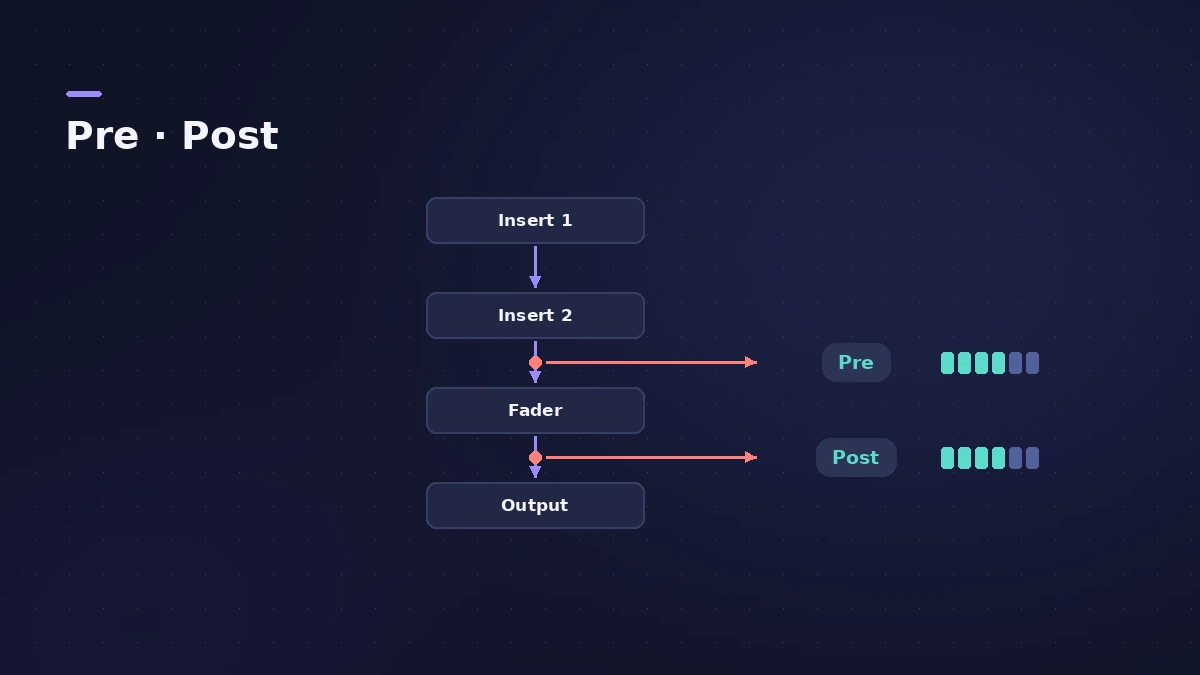
Add the Pre-Fader Metering button to the control bar (customize the control bar) and click it, so meters show the level after plug-ins but before the fader.
-
2
Set the source level
Adjust each track's level at the start with region gain or the Gain plug-in, so plug-ins get a healthy signal.
-
3
Check each plug-in
Match output to input on plug-ins that add level, so bypassing a plug-in doesn't jump in volume.
-
4
Balance with faders
Use faders for the balance; with pre-fader metering they don't hide a track that's clipping.
-
5
Leave headroom on the output
Keep the Stereo Out clear of clipping and leave room for mastering.
Common mistakes
- Reading post-fader meters and missing a track that clips before its fader.
- Fixing a hot track with the fader instead of at the source.
- Moving the Stereo Out fader to fix a mix level — it affects the bounce too.
Measure the result
Check the master with MultiMeter and LUFS loudness. For final loudness, see mastering in Logic Pro.
Sources
- Sound On Sound — Gain Staging in Logic Pro (Nov 2021)
- Logic Studio Training — Gain staging in Logic Pro: 3 fixes
- Logic Studio Training — Understanding digital clipping in Logic Pro
- MusicRadar — What is gain staging and how can it help you mix?
- Apple — Logic Pro Effects 10.2: Gain plug-in (old)
- Sonarworks — Logic creative mixing with subgroups and masters
Checked November 2026. Logic ProFiles is independent of Apple; menu names can differ slightly between Logic Pro versions.
Frequently asked questions
What is pre-fader metering in Logic Pro?
+
A mode where the meters show the signal after plug-ins but before the fader, so fader moves don't change what you see.
Do I need to gain stage in a 32-bit floating point DAW?
+
Sound On Sound says you needn't obsess, but sensible levels help plug-in emulations behave more like their hardware inspirations.
Related
- Decibels to gain ratio calculatorConvert decibels to an amplitude multiplier and back: what −6 dB or +3 dB does to level and power, with a quick table for fader and Gain plug-in moves.
- dBFS to dBu calculatorConvert dBFS in Logic Pro to dBu and volts for your interface's calibration (0 dBFS = +18 or +24 dBu) and see where +4 dBu line level sits on the meter.
- Logic Pro recording distortedVocals or guitar sound harsh and distorted in Logic Pro? Lower interface gain until peaks stay out of the red, and keep the master below 0 dB.
- Logic Pro recording too quietVocals or guitar recording too quietly in Logic Pro? Raise interface gain, check the input device and track input, phantom power and Mic Mode.
- Region gain and normalize in Logic ProChange audio region gain in Logic Pro with the Gain tool or Region inspector (−30 to +30 dB), and normalize regions to a Peak or Loudness target.
- Gain plug-in in Logic ProUse Logic Pro's Gain plug-in to change level by dB, invert phase (polarity) on a snare-bottom mic, sum stereo to mono, swap left and right and adjust balance.
- Stereo Out vs Master channel strip in Logic ProThe difference between Logic Pro's Stereo Out and Master channel strips: where mastering plug-ins go, which fader affects the bounce, and how Dim works.
- MultiMeter in Logic ProCheck a mix with Logic Pro's MultiMeter: spectrum Analyzer, Goniometer for stereo, Correlation meter for mono compatibility, Level and AES 128 Loudness meters.
- Mix and master in Logic ProMix and master songs in Logic Pro with stock tools: vocal tuning, EQ, compression, sends, automation, Mastering Assistant, LUFS targets and Dolby Atmos.