Editing
The Logic Pro Piano Roll Editor
The Piano Roll shows MIDI notes as bars against a vertical keyboard: position is timing, height is pitch, length is duration. Select a MIDI region and press P to open it. Add notes with the Pencil, drag to move or resize, adjust velocity, and quantize just the notes you select.
 Owen Hartley

Where to find it
Select a MIDI region, press P
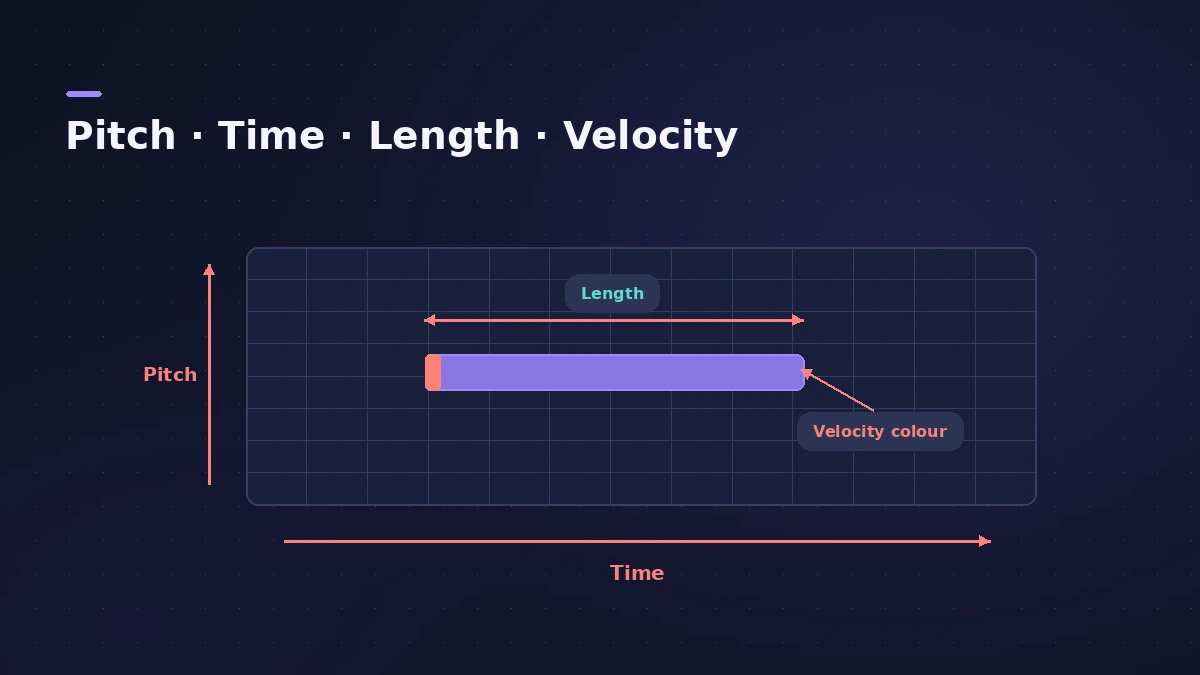
Piano Roll basics
| Task | How |
|---|---|
| Open | P |
| Add a note | Pencil tool, click |
| Delete a note | Eraser tool, or select and press Delete |
| Quantize notes | Select, choose a value, adjust Strength and Swing |
| Change velocity | Edit note velocity in the Piano Roll |
Entering notes one at a time instead? See step input.
Step by step
-
1
Open the Piano Roll
Select a MIDI region and press P.
-
2
Add notes
Choose the Pencil tool and click where you want a note. The vertical keyboard shows the pitch.
-
3
Move, resize and copy
Drag notes with the Pointer to move them and drag a note's end to change its length.
-
4
Set velocity
Edit note velocity to make notes softer or louder; MIDI velocity runs from 1 to 127.
-
5
Quantize selected notes
Select notes and choose a quantize value; drag the Strength and Swing sliders to keep some feel.
Common mistakes
- Editing with Snap set too coarse, so notes jump to the wrong position.
- Leaving all notes at one velocity, which sounds mechanical.
Sources
- Apple — Logic Pro User Guide for Mac 12.3 (table of contents)
- Apple — Logic Pro X 10.1 Help: Quantize the timing of notes in the Piano Roll Editor (old)
- Apple — Logic Pro for iPad User Guide: Overview of the Piano Roll Editor
- Apple — Logic Pro X 10.1 Help: Common tools (old)
- Apple — Logic Pro X 10.4 Help: MIDI region parameters (old)
Checked November 2026. Logic ProFiles is independent of Apple; menu names can differ slightly between Logic Pro versions.
Frequently asked questions
How do I open the Piano Roll in Logic Pro?
+
Select a MIDI region and press P.
Can I see note names in the Piano Roll?
+
Yes — Apple's guide describes note labels that show pitch and velocity when you zoom in far enough.
Related
- Middle C in Logic Pro: C3 or C4?Why Logic Pro can label middle C as C3 or C4, what MIDI note 60 is, how the Yamaha and Roland conventions differ, and where to switch the display.
- MIDI CC list for Logic ProThe MIDI CC numbers you'll use most in Logic Pro: CC1 modulation, CC7 volume, CC10 pan, CC11 expression, CC64 sustain, CC74 cutoff, and where to edit them.
- Piano Roll Editor in Logic Pro for iPadEdit MIDI in Logic Pro for iPad's Piano Roll: Pencil and Brush to add notes, Velocity and Select modes, Snap values, quantize and region automation.
- Velocity Processor in Logic ProEven out or exaggerate playing with Logic Pro's Velocity Processor: Compress/Expand, Value/Range limiting, Add/Scale, and note range for drum or keyboard parts.
- Event List in Logic ProUse the Event List in Logic Pro to see and edit every MIDI event as numbers: position, channel, value and length; filter by type; fix stray controllers.
- Score Editor in Logic Pro — sheet music from MIDITurn MIDI into sheet music with Logic Pro's Score Editor: open it with Command-5, edit notes and symbols, add lyrics, tab and chord grids, then print or PDF.
- Humanize MIDI in Logic Pro — the MIDI Transform windowHumanize MIDI in Logic Pro with the MIDI Transform window: choose the Humanize preset, set random Position, Velocity and Length, or try Random Velocity.
- How to quantize MIDI and audio in Logic ProQuantize MIDI and audio in Logic Pro: pick a grid in the Region inspector, add swing, use strength and range to keep the feel, quantize notes in the Piano Roll.
- How to record MIDI with a keyboard in Logic ProRecord MIDI from a keyboard in Logic Pro: arm an instrument track, record with a count-in, overdub, replace or take passes in Cycle mode, then quantize.
- Step input in Logic Pro — enter notes without playingEnter MIDI notes one at a time in Logic Pro with step input: use the Step Input Keyboard or a MIDI keyboard, set note lengths and add chords and rests.
- Editing in Logic ProEdit audio and MIDI in Logic Pro: comp takes, quantize, Flex Time, Smart Tempo, change tempo or key, Stem Splitter, audio to MIDI, fades and Remove Silence.