Editing
How to quantize MIDI and audio in Logic Pro
Quantizing moves notes that are off the beat to the nearest grid position. Choose a value such as 1/16 Note in the Region inspector's Quantize menu and the whole region snaps to it. It's non-destructive — the original timing is kept, so you can change your mind. Swing, strength and range settings let you tighten a part without making it robotic.
 Owen Hartley

Where to find it
Region inspector > Quantize
Advanced quantize parameters
| Parameter | What it does |
|---|---|
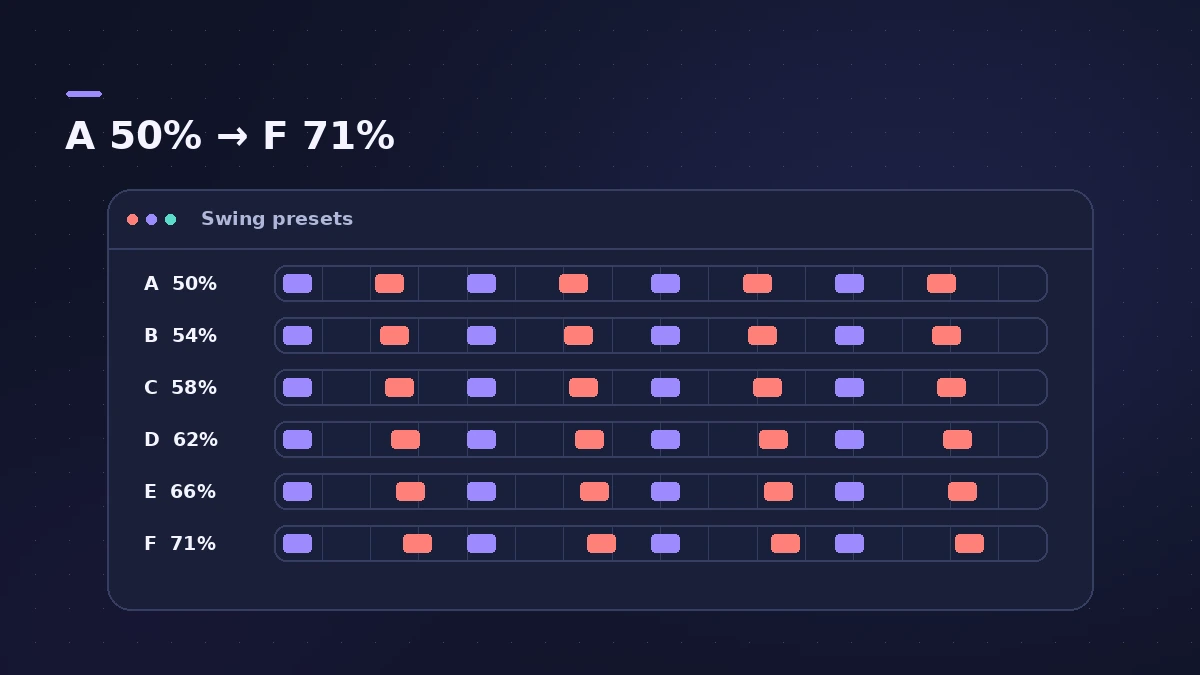
| Q-Swing | Shifts every second grid point by a percentage |
| Q-Strength | How far notes move toward the grid |
| Q-Range | Which notes are affected, by distance from the grid |
| Q-Flam, Q-Velocity, Q-Length | Further options in the same section of the Region inspector |
Step by step
-
1
Select the region
Select one or more MIDI or audio regions in the Tracks area.
-
2
Choose a grid
In the Region inspector's Quantize pop-up menu, pick the smallest note value in the part — 1/8 or 1/16 for most grooves.
-
3
Add swing if the part needs it
Pick a swing value or set Q-Swing. Swing delays every second grid point by a percentage.
-
4
Keep the feel
Lower Q-Strength to move notes only part of the way, or use Q-Range so only the worst-timed notes move.
-
5
Make it permanent if needed
Region quantize stays editable. Apply it permanently only when you need to edit the quantized positions further.
Common mistakes
- Choosing a grid finer or coarser than the part — triplets need triplet values.
- Quantizing everything at 100% strength and losing the groove.
Quantizing audio
For audio regions Logic Pro first analyses transients, then uses Flex Time to move them. See Flex Time. For note-by-note edits, quantize selected notes in the Piano Roll.
Sources
- Apple — Logic Pro User Guide: Quantize regions
- Apple — Logic Pro X 10.1 Help: Quantize parameter values (old)
- Apple — Logic Pro X 10.4 Help: Advanced quantization parameters (old)
- Apple — Logic Pro X 10.1 Help: Quantize the timing of notes in the Piano Roll Editor (old)
- Apple — Logic Pro for iPad User Guide: Quantize parameters for MIDI regions
- Apple — Logic Pro for iPad User Guide: Quantize audio regions
Checked November 2026. Logic ProFiles is independent of Apple; menu names can differ slightly between Logic Pro versions.
Frequently asked questions
Is quantizing in Logic Pro destructive?
+
Region quantize isn't. Apple says it changes playback positions while the original positions stay in the region.
What do Swing A to F mean?
+
They delay every second grid point: A is 50% (no swing), then 54, 58, 62, 66 and F at 71%.
Can I quantize just a few notes?
+
Yes. Select them in the Piano Roll and quantize there, with Strength and Swing sliders.
Related
- Flex Time artifacts in Logic ProFlex Time making audio warbly or glitchy in Logic Pro? Match the algorithm to the material, use Percussive and Complex, and fix transient markers.
- Groove templates in Logic ProMake a groove template in Logic Pro from an audio or MIDI region with Make Groove Template, quantize other parts to its feel and keep the source region.
- Humanize MIDI in Logic Pro — the MIDI Transform windowHumanize MIDI in Logic Pro with the MIDI Transform window: choose the Humanize preset, set random Position, Velocity and Length, or try Random Velocity.
- Score Editor in Logic Pro — sheet music from MIDITurn MIDI into sheet music with Logic Pro's Score Editor: open it with Command-5, edit notes and symbols, add lyrics, tab and chord grids, then print or PDF.
- Flex Time in Logic Pro — fix audio timingUse Flex Time in Logic Pro to fix and quantize audio timing: turn on Flex, choose Slicing, Rhythmic, Monophonic or Polyphonic, then drag or quantize.
- The Logic Pro Piano Roll EditorEdit MIDI in the Logic Pro Piano Roll: open it with P, add and move notes, change length and velocity, quantize selected notes and colour notes by velocity.
- How to record MIDI with a keyboard in Logic ProRecord MIDI from a keyboard in Logic Pro: arm an instrument track, record with a count-in, overdub, replace or take passes in Cycle mode, then quantize.
- Editing in Logic ProEdit audio and MIDI in Logic Pro: comp takes, quantize, Flex Time, Smart Tempo, change tempo or key, Stem Splitter, audio to MIDI, fades and Remove Silence.