Plug-ins
Amp Designer in Logic Pro
Amp Designer emulates more than 20 well-known guitar amplifiers with the cabinets used with them, plus seven virtual microphones you can position. Start from a preconfigured model or build a hybrid by choosing the amp, speaker, EQ and microphone yourself.
 Owen Hartley
Where to find it
Audio Effect slot > Amps and Pedals > Amp Designer
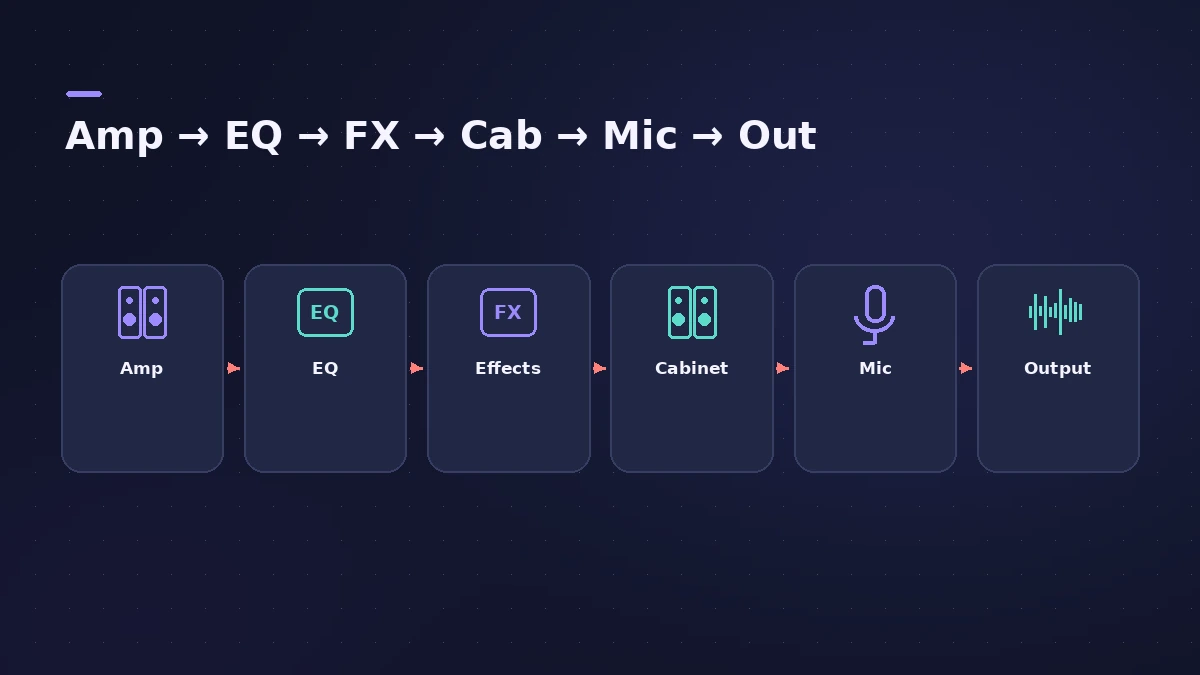
Amp Designer sections
| Section | What you set |
|---|---|
| Model / Amp / Speaker / Mic | A ready combo, or each part chosen separately |
| Amp | Input gain, presence and the Master level |
| EQ | EQ model with Bass, Mids and Treble |
| Effects | Spring reverb, vibrato and tremolo |
| Microphone | Mic type and position in the X/Y pad |
| Output | Final level sent on to the next plug-in |
Choosing a microphone
| Mic type | Sound |
|---|---|
| Condenser | Fine, transparent and well balanced |
| Dynamic | Brighter and more cutting than condensers |
Apple's guide also notes that closed-back cabinets project forward and tend to sound more powerful with a tighter low end, and that vintage speaker models can sound looser and smoother than new ones.
Step by step
-
1
Insert Amp Designer
On a guitar track choose Amps and Pedals > Amp Designer. Record the guitar clean — see record electric guitar — so you can change the amp later.
-
2
Pick a model
Choose a preconfigured model: each combines an amp, cabinet, EQ type and microphone.
-
3
Swap the cabinet
Cabinets change the character a lot. Try a small speaker with a big head or the reverse — Amp Designer lets you mix them freely.
-
4
Choose and place the mic
Pick a condenser for a fine, balanced sound or a dynamic for a brighter, more cutting one, then drag the dot in the X/Y pad to move it.
-
5
Set gain, EQ and effects
Adjust Gain and the Bass, Mids and Treble knobs, add the built-in reverb, tremolo or vibrato, and set the final Output level.
-
6
Save your combo
Save a hybrid you like as a setting; it keeps all parameter changes.
Common mistakes
- Recording through the amp instead of recording clean and amping afterwards.
- Turning Master up for level — it also shapes the tone; use Output for the final level.
- Treating the cabinet as an afterthought, when it has a huge impact on the sound.
Add pedals
Put Pedalboard before Amp Designer for overdrives, wahs and modulation, and tune up first with the Tuner. For bass guitar, use Bass Amp Designer.
Sources
- Apple — Logic Pro for iPad User Guide: Amp Designer
- Apple — Logic Pro for iPad User Guide: Build a custom Amp Designer combo
- Apple — Logic Pro Effects 10.2: Amp Designer overview (old)
- Apple — Logic Pro 9 Effects: Amp Designer (old)
- Apple — Logic Pro for iPad User Guide 3.0: Amp Designer cab and mic controls
- Apple — Logic Pro X 10.4.5 Help: Build a custom Amp Designer combo (old)
Checked November 2026. Logic ProFiles is independent of Apple; menu names can differ slightly between Logic Pro versions.
Frequently asked questions
How many amps does Amp Designer have?
+
Apple says it emulates more than 20 famous guitar amplifiers and the speaker cabinets used with them, with seven microphone types.
Can I use Amp Designer on vocals or other instruments?
+
Yes. Apple suggests it for sound design too — for example giving a trumpet or vocal part the character of a guitar amp.
How do I blend two mic sounds?
+
Duplicate the guitar track, insert Amp Designer on both with the same settings but different microphones, then balance the two tracks.
Related
- Record and produce a rock band in Logic ProProduce a rock song in Logic Pro: sketch with a Rock Drummer, record DI guitars into Amp Designer, add bass and vocals, then mix with buses and compression.
- Using MainStage as a guitar rigUse MainStage as a live guitar rig: connect your guitar, start from a guitar template with Amp Designer and Pedalboard, bypass pedals by foot, and tune.
- How to reamp guitar in Logic ProReamp a clean DI guitar through a real amp from Logic Pro: record DI, send it to a spare output and a reamp box, mic the amp and record it back on a new track.
- How to record electric guitar in Logic ProRecord electric guitar into Logic Pro: use the Hi-Z input, tune with the Tuner, pick an Amp Designer and Pedalboard tone and keep latency low.
- Pedalboard in Logic ProUse Pedalboard in Logic Pro: drag stompboxes from the Pedal Browser, set their order, split the signal into Bus A and Bus B with the Router and mix them back.
- Bass Amp Designer in Logic ProShape bass guitar in Logic Pro with Bass Amp Designer: three amp models, a D.I. box channel, blend amp and DI, built-in compressor and graphic or parametric EQ.
- Tuner in Logic ProTune a guitar, bass or any instrument in Logic Pro with the control-bar Tuner or the Tuner plug-in: read cents, change the A=440 reference, mute while tuning.
- Plug-ins in Logic ProGuides to Logic Pro's stock plug-ins: Compressor, EQs, limiters, Pitch Correction, Amp Designer, Pedalboard, ChromaGlow, ChromaVerb, Space Designer and delays.