Mix & Master
How to use Channel EQ in Logic Pro
Channel EQ is Logic Pro's everyday equalizer. It has eight bands — a high-pass filter, a low shelf, four bell bands, a high shelf and a low-pass filter — and a built-in Analyzer that shows the frequency spectrum as the track plays. Its settings are identical to Linear Phase EQ, so you can swap between them.
 Owen Hartley

Where to find it
Audio Effect slot > EQ > Channel EQ
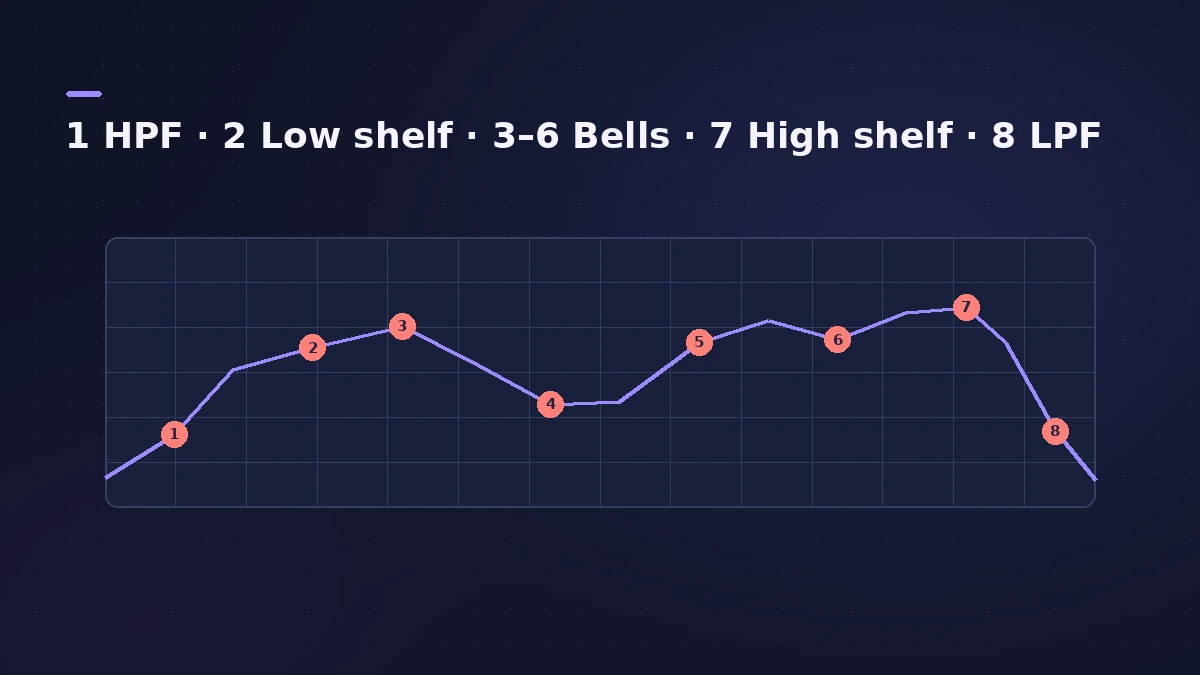
Channel EQ bands
| Band | Type | Typical use |
|---|---|---|
| 1 | High-pass filter | Remove rumble below a part's useful range |
| 2 | Low shelf | Add or reduce overall low end |
| 3–6 | Parametric bells | Cut resonances, boost presence |
| 7 | High shelf | Add air or soften top end |
| 8 | Low-pass filter | Remove hiss or harsh top |
On stereo material, Channel EQ can also process only the left, right, mid or side signal (Apple's iPad guide lists Left Only, Right Only, Mid Only and Side Only). For vocals, see mixing vocals.
Step by step
-
1
Insert Channel EQ
Click an empty Audio Effect slot on the channel strip and choose Channel EQ from the EQ category.
-
2
Turn on the Analyzer
Click Analyzer and play the track. The curve shows peaks and dips across the spectrum. Turn it off when you're done, as it uses processing power.
-
3
High-pass what doesn't need lows
Switch on Band 1, the high-pass filter, and raise its frequency until the part starts to thin out, then back off slightly.
-
4
Cut problem frequencies
Use bands 3 to 6, the parametric bells, to cut resonances. Drag a point in the display to set frequency and gain; adjust Q for width.
-
5
Shape with the shelves
Band 2 (low shelf) and Band 7 (high shelf) lift or lower everything below or above their frequency.
-
6
Level-match the output
Use Master Gain after boosting or cutting so the EQ'd track isn't louder than before — otherwise louder will just sound better.
Common mistakes
- Leaving the Analyzer on for every track and wasting CPU.
- Boosting high frequencies near the top of the spectrum without HQ at lower sample rates.
- Judging EQ changes without matching level using Master Gain.
Q-Couple, HQ and Linear Phase EQ
Q-Couple adjusts bandwidth automatically as you change gain, preserving the perceived width of a bell. HQ turns on oversampling — Apple recommends it when you EQ above about 5 kHz in projects below 96 kHz, where filters can otherwise sound harsh. Linear Phase EQ shares the same parameters, and Logic Pro carries the settings over if you swap one for the other in the same slot.
Sources
- Apple — Logic Pro User Guide: Channel EQ parameters in Logic Pro for Mac
- Apple — Logic Pro X 10.2 Effects Help: Channel EQ parameters (old)
- Apple — Logic Pro for iPad User Guide: Channel EQ
- Apple — Logic Pro 9 Help: Channel EQ (old)
Checked November 2026. Logic ProFiles is independent of Apple; menu names can differ slightly between Logic Pro versions.
Frequently asked questions
How many bands does Logic Pro's Channel EQ have?
+
Eight: high-pass, low shelf, four parametric bells, high shelf and low-pass.
What's the difference between Channel EQ and Linear Phase EQ?
+
They have identical parameters, so you can copy settings between them. As the name says, Linear Phase EQ keeps phase linear; Channel EQ is the one most channel strips start with.
Related
- Logic Pro EQs comparedWhich Logic Pro EQ to use: Channel EQ for everyday mixing, Linear Phase EQ for mastering, Vintage EQs for colour and Match EQ to copy a reference curve.
- Room mode calculatorEnter your room's length, width and height to find axial room modes — the bass frequencies that boom or vanish at your mix position — in metres or feet.
- Note to frequency calculatorFind the frequency of any note with your own A4 reference, its MIDI note number, and the nearest note and cents for any frequency — for EQ and tuning.
- Linear Phase EQ in Logic ProLinear Phase EQ in Logic Pro has the same eight bands as Channel EQ but no phase shift. When to use it, why it adds latency, and how to switch between the two.
- The Vintage EQ collection in Logic ProThe Vintage EQ collection in Logic Pro: what Vintage Console, Graphic and Tube EQ each do, how Drive and output models add colour, Natural vs Linear phase.
- How to mix vocals in Logic ProMix vocals in Logic Pro with stock plug-ins: tune with Flex Pitch, clean up with Channel EQ, control level with Compressor, add reverb on a send and automate.
- How to mix a song in Logic Pro, step by stepA step-by-step mixing workflow for Logic Pro with stock plug-ins: organise tracks, balance levels, EQ, compress, add space with sends, automate, check loudness.
- A mastering chain in Logic Pro with only stock plug-insMaster in Logic Pro by hand with stock plug-ins: EQ, compression, Adaptive Limiter with the right Out Ceiling and True Peak Detection, then the Loudness Meter.
- Mix and master in Logic ProMix and master songs in Logic Pro with stock tools: vocal tuning, EQ, compression, sends, automation, Mastering Assistant, LUFS targets and Dolby Atmos.