Recording
Headphone cue mix in Logic Pro
A performer often needs a different balance from yours — more of their own voice, more click, less guitar. A cue mix built from pre-fader sends lets you change your control-room mix without changing what they hear.
 Owen Hartley

Where to find it
Mixer > Send slots > Pre Fader
How the cue mix is routed
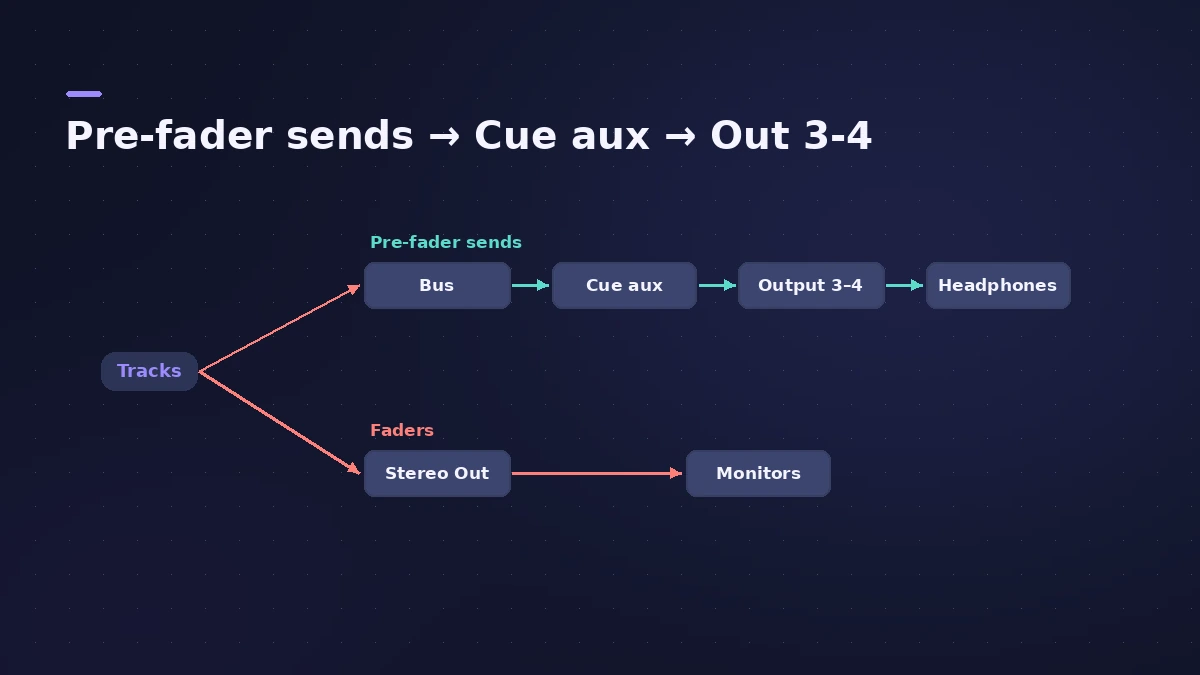
| Your mix | Performer's mix |
|---|---|
| Channel faders | Pre-fader send levels |
| Stereo Out → Output 1-2 | Cue aux → Output 3-4 |
| Monitors | Headphones |
Step by step
-
1
Add sends to a bus
Select the tracks for the cue mix and add a send to a free bus; Logic Pro creates an aux channel for it.
-
2
Make the sends pre-fader
Click the send slot and choose Pre Fader, so your channel faders don't change the cue mix.
-
3
Start from your mix
Choose Copy Fader to Send to copy your current balance into the sends, then adjust.
-
4
Route the aux to the headphones
Set the aux output to the interface outputs that feed the performer's headphones — for example Output 3-4.
-
5
Balance on the faders
Use Sends on Fader in the Mixer to control the send levels with the channel faders.
Common mistakes
- Using post-fader sends, so every change to your mix also changes the singer's headphones.
- Routing the cue aux to the Stereo Out instead of separate outputs.
Several performers
Each extra cue mix needs another bus, aux and pair of outputs, often into a headphone amp. More on routing in aux sends and buses.
Sources
- Dummies — How to set up multiple monitor mixes in Logic Pro X
- Apple — Control sends on faders in Logic Pro for Mac
- Sonarworks — Logic monitoring techniques (Copy Fader to Send)
- MusicTech — Better recording workflow in Logic Pro X, part 2
Checked November 2026. Logic ProFiles is independent of Apple; menu names can differ slightly between Logic Pro versions.
Frequently asked questions
Why use pre-fader sends for a cue mix?
+
Pre-fader send levels are independent of the channel fader, so the performer's mix isn't affected by changes you make to your own.
Can I just mirror my main mix to the headphone output?
+
Yes — Logic Pro's output settings can mirror the stereo output to another pair — but the performer then hears exactly your mix.
Related
- Use two audio interfaces in Logic Pro with an aggregate deviceCombine two audio interfaces or USB mics into one aggregate device in Audio MIDI Setup, set the clock source and drift correction, then select it in Logic Pro.
- Headphones for Logic Pro: open-back or closed-back?Which headphones to use with Logic Pro: closed-back for recording without bleed, open-back for mixing in quiet rooms, and binaural monitoring for Dolby Atmos.
- Aux sends and buses in Logic ProSet up aux sends in Logic Pro: send several tracks to one reverb on a bus, choose pre fader, post fader or post pan, and use Sends on Faders for headphones.
- How to record vocals in Logic ProRecord vocals in Logic Pro: set up the mic and pop filter, arm an audio track, set the level, monitor without delay and record several takes to comp later.
- How to record multiple tracks at once in Logic ProRecord a band, drum kit or podcast in Logic Pro: one input and track per mic, arm them all, record in one pass, and add inputs with an aggregate device.
- Feedback when recording in Logic ProScreeching or howling when you record in Logic Pro? Use headphones, turn monitoring off on speakers, avoid built-in mic and speakers, check loopback.
- Recording in Logic ProHow to record in Logic Pro: vocals, electric and acoustic guitar, bass, drums and MIDI, plus cycle takes, punch-in, Flashback Capture and step input.