Recording
How to record multiple tracks at once in Logic Pro
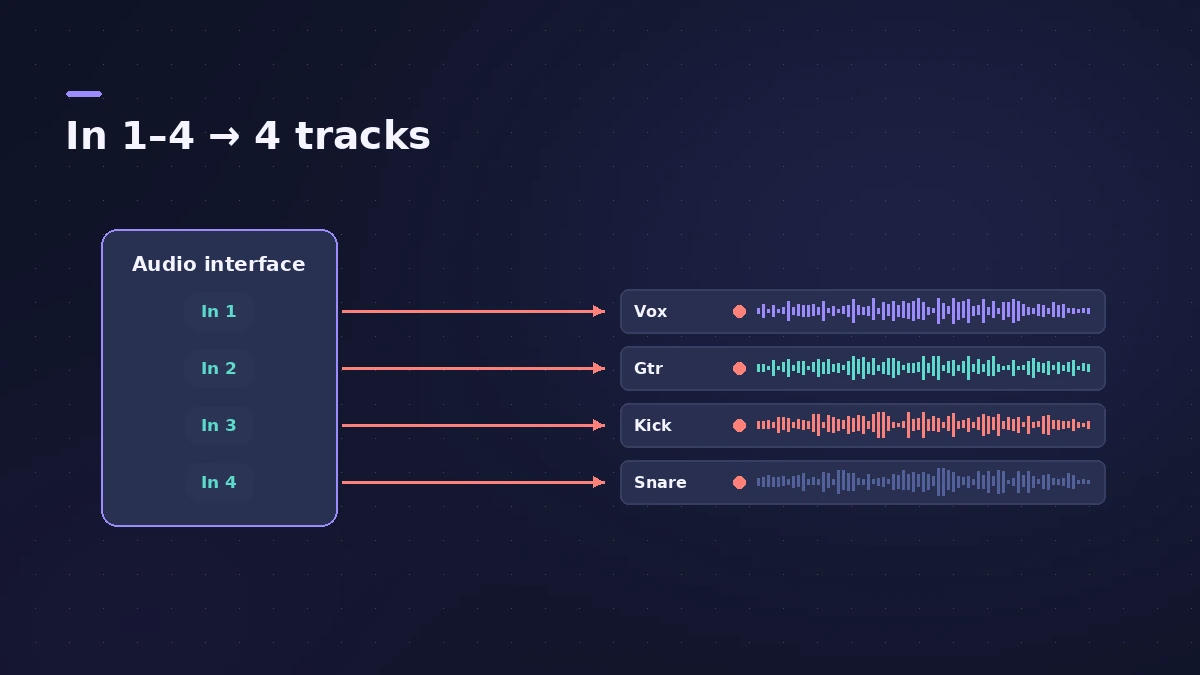
Logic Pro records as many tracks at once as your interface has inputs. The rule is simple: each track you record at the same time needs its own input. Create one audio track per mic or instrument, set the inputs, arm them all and press R. Need more inputs? Combine interfaces into an aggregate device in Audio MIDI Setup.
 Owen Hartley

Where to find it
Track > New Tracks (Audio, several at once)
Typical setups
| Session | Inputs | Tracks |
|---|---|---|
| Singer-songwriter | 2 | Vocal + guitar |
| Podcast, two hosts | 2 | One per host |
| Four-mic drums | 4 | Kick, snare, two overheads |
| Small band | 8+ | One per mic or DI |
Recording a kit? See record drums.
Step by step
-
1
Create one track per source
In the New Tracks dialog choose Audio and set the number of tracks, or add them one by one.
-
2
Give each track its own input
Set Input 1, Input 2 and so on in each channel strip so they match the interface inputs the mics are plugged into.
-
3
Name the tracks
Name each track after its source (Vox, Gtr, Kick) so the takes are easy to find later.
-
4
Arm all tracks
Click Record Enable on each track. Logic Pro won't arm two audio tracks that share the same input.
-
5
Record
Press R. Every armed track records in the same pass.
Common mistakes
- Two tracks on the same input — only one can be armed.
- Forgetting to check every level before the take.
- Mixing mono and stereo inputs by mistake — a stereo track uses two inputs.
More inputs with an aggregate device
In Audio MIDI Setup, create an Aggregate Device that combines several interfaces (or USB mics), then choose it as the Output Device in Logic Pro > Settings > Audio > Devices. Apple notes the order you tick the devices sets the input numbering.
Sources
- Apple — Logic Pro 9 manual: Recording multiple tracks simultaneously (old)
- Apple — Logic Pro X 10.4 Help: Record to multiple audio tracks (old)
- Apple Support — Create an Aggregate Device to combine multiple audio devices
- Apple — Logic Pro User Guide for Mac 12.3 (table of contents)
Checked November 2026. Logic ProFiles is independent of Apple; menu names can differ slightly between Logic Pro versions.
Frequently asked questions
How many tracks can Logic Pro record at once?
+
In practice, as many as you have inputs: each simultaneously recorded track needs a unique input.
Can I record with two USB microphones?
+
Yes, by combining them into an aggregate device in Audio MIDI Setup and assigning each mic's channel to its own track.
Can I record MIDI and audio at the same time?
+
Yes — Apple's guide covers recording software instruments and audio simultaneously; arm both kinds of track.
Related
- How to use a USB microphone in Logic ProSet up a USB microphone in Logic Pro: choose it as the input device, pick the output for headphones, arm a mono track, set gain on the mic and use two USB mics.
- How to record drums in Logic ProRecord a drum kit in Logic Pro: start with overheads, add kick and snare mics, give each mic its own input and track, then group them in a Track Stack.
- How to record acoustic guitar in Logic ProRecord acoustic guitar in Logic Pro with one or two mics: aim near the 12th fret about a foot away, use the 3:1 rule for two mics and set levels.
- How to set up an audio interface in Logic ProConnect a USB or Thunderbolt audio interface to Logic Pro: choose input and output devices, set the I/O buffer, allow mic access and pick track inputs.
- Recording in Logic ProHow to record in Logic Pro: vocals, electric and acoustic guitar, bass, drums and MIDI, plus cycle takes, punch-in, Flashback Capture and step input.