Recording
How to record acoustic guitar in Logic Pro
The classic starting point is one condenser mic about a foot (30 cm) from the guitar, aimed near the 12th fret. Move it toward the bridge for more body. With two mics, keep them at least three times as far from each other as from the guitar. In Logic Pro that means one mono track per mic.
 Owen Hartley

Where to find it
Audio track(s) on the mic inputs
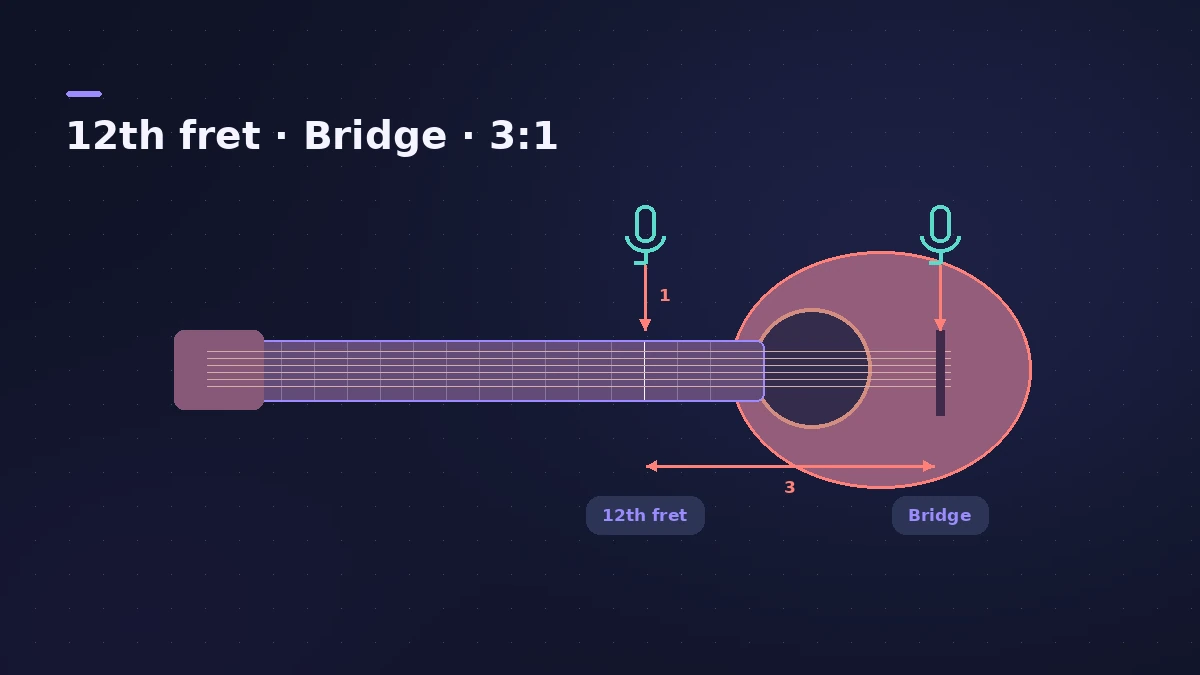
Placement at a glance
| Position | Sound |
|---|---|
| 12th fret, ~30 cm | Crisp strings, balanced — the usual start |
| Toward the bridge | More body and resonance |
| Two mics: 12th fret + bridge | Strings plus body, needs phase care |
Recording several mics at once is covered in record multiple tracks.
Step by step
-
1
Place one mic
Start about 30 cm away, aimed near the 12th fret. Angle toward the bridge for more body, toward the neck for more string detail.
-
2
Add a second mic (optional)
Point one at the 12th fret and one at the bridge area, or use a close and a distant mic. Space them by at least three times their distance from the guitar to limit phase problems.
-
3
Make one track per mic
Create a mono audio track for each mic, each on its own input. Each track you record at the same time needs its own input.
-
4
Tune and set levels
Tune with the Tuner, then play the loudest part and set interface gain so the meters stay out of the red.
-
5
Arm and record
Arm both tracks and press R. Listen back in mono to check the two mics don't thin each other out.
Common mistakes
- Aiming straight into the soundhole, which tends to sound boomy.
- Placing two mics too close together, causing phase cancellation.
- Letting the player move during the take — distance changes the tone.
Sources
- Recording Magazine — Going deep with acoustic guitar miking
- Universal Audio — How to mic an acoustic guitar in stereo
- Apple — Logic Pro 9 manual: Recording multiple tracks simultaneously (old)
- Apple — Logic Pro X 10.4 Help: Record to multiple audio tracks (old)
- Apple — Logic Pro Effects 10.2: Tuner (old)
Checked November 2026. Logic ProFiles is independent of Apple; menu names can differ slightly between Logic Pro versions.
Frequently asked questions
One mic or two for acoustic guitar?
+
One well-placed mic is often enough and easier to mix. Two give width and options but need care with phase.
What's the 3:1 rule?
+
The distance between two mics should be at least three times the distance from each mic to the guitar, which reduces phase cancellation.
Can I record guitar and vocals at the same time?
+
Yes, on separate tracks with separate inputs. Expect some spill between the mics.
Related
- Make a singer-songwriter demo in Logic ProMake a singer-songwriter demo in Logic Pro: record guitar and vocal, then add a Songwriter Drummer, Bass Player and Keyboard Player that follow your chords.
- Mic distance to delay calculatorTurn the distance between two mics into delay in milliseconds and samples, with air temperature, to line up close and room mics or a DI and amp in Logic Pro.
- How to record electric guitar in Logic ProRecord electric guitar into Logic Pro: use the Hi-Z input, tune with the Tuner, pick an Amp Designer and Pedalboard tone and keep latency low.
- How to record multiple tracks at once in Logic ProRecord a band, drum kit or podcast in Logic Pro: one input and track per mic, arm them all, record in one pass, and add inputs with an aggregate device.
- How to record vocals in Logic ProRecord vocals in Logic Pro: set up the mic and pop filter, arm an audio track, set the level, monitor without delay and record several takes to comp later.
- Recording in Logic ProHow to record in Logic Pro: vocals, electric and acoustic guitar, bass, drums and MIDI, plus cycle takes, punch-in, Flashback Capture and step input.