Recording
How to record bass guitar in Logic Pro
Most bass is recorded direct: plug into the interface's instrument input and record a clean signal. In Logic Pro, Bass Amp Designer then gives you two channels — a modelled amp with cabinet and mic, and a Direct Box — that you can use alone or blend. Because the clean bass is what's recorded, you can change the sound at any time.
 Owen Hartley

Where to find it
Audio track > Bass Amp Designer
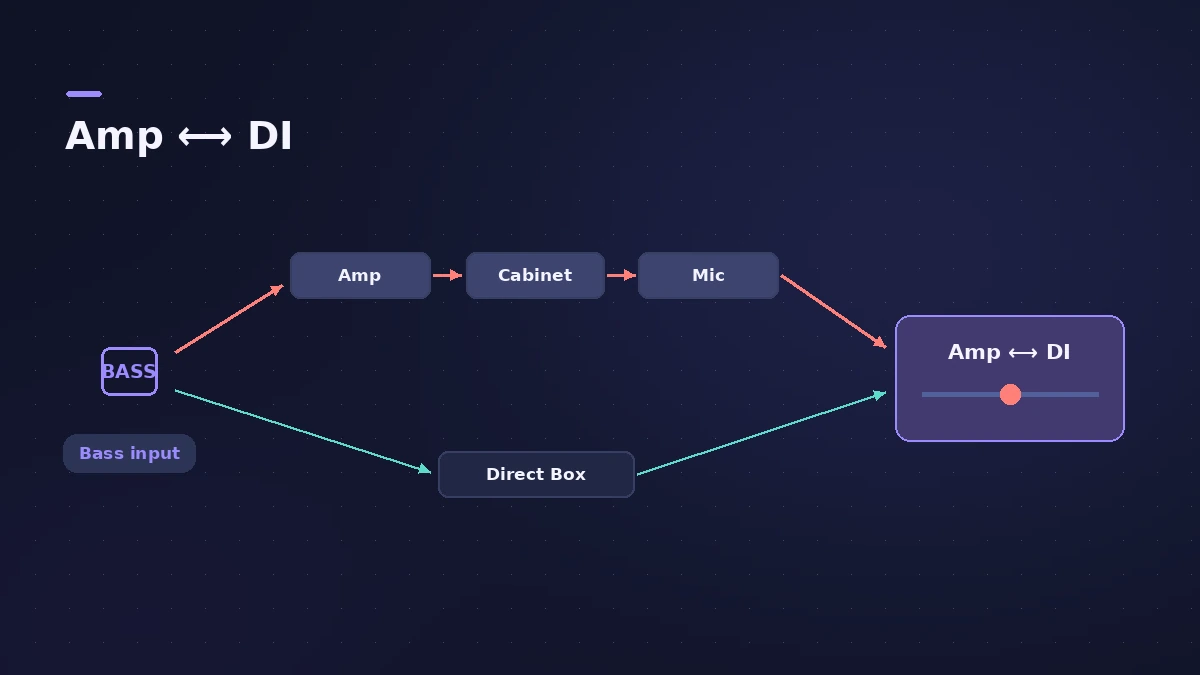
Amp/DI blend positions
| Blend | What you hear |
|---|---|
| Fully DI | Direct Box only — clean and tight |
| Fully Amp | Pre-amp, power amp, cabinet and mic |
| In between | Both channels in parallel |
Step by step
-
1
Plug in and set gain
Connect the bass to the instrument (Hi-Z) input and set the gain so the hardest notes stay out of the red.
-
2
Tune
Use the Tuner in the control bar or the Tuner plug-in on the bass channel strip.
-
3
Insert Bass Amp Designer
Add it from Amps and Pedals in an Audio Effect slot, then pick a model — an amp, cabinet and mic combination.
-
4
Blend amp and Direct Box
Use the Amp/DI mix control: fully toward DI for the Direct Box alone, fully toward Amp for the amp alone, anywhere between to run both in parallel.
-
5
Record
Arm the track and press R. Adjust the amp sound afterwards if you like.
Common mistakes
- Clipping on hard slap or pick attacks — set gain on the loudest playing.
- Treating the amp sound as final; the dry bass is what's recorded.
- Forgetting to retune between songs.
Go further
Sound On Sound suggests duplicating the bass track to run amp and DI on separate tracks, and layering a synth bass for weight. For guitars, see record electric guitar.
Sources
- Apple — Logic Pro Effects 10.2: Bass Amp Designer overview (old)
- Apple — Logic Pro for iPad User Guide: Use the Bass Amp Designer Direct Box
- Sound On Sound — Bass guitar recording in Logic Pro X (Aug 2017)
- Apple — Logic Pro 9 manual: Enabling software monitoring for recording (old)
- Apple — Logic Pro Effects 10.2: Tuner (old)
Checked November 2026. Logic ProFiles is independent of Apple; menu names can differ slightly between Logic Pro versions.
Frequently asked questions
Should I record bass DI or through an amp?
+
Direct is simpler and lets you choose the amp sound later with Bass Amp Designer, which includes both an amp and a Direct Box.
What is the Direct Box in Bass Amp Designer?
+
A model of a well-known American DI unit with gain, tone and a high-cut switch, usable alone or blended with the amp.
Related
- How to reamp guitar in Logic ProReamp a clean DI guitar through a real amp from Logic Pro: record DI, send it to a spare output and a reamp box, mic the amp and record it back on a new track.
- Bass Amp Designer in Logic ProShape bass guitar in Logic Pro with Bass Amp Designer: three amp models, a D.I. box channel, blend amp and DI, built-in compressor and graphic or parametric EQ.
- Tuner in Logic ProTune a guitar, bass or any instrument in Logic Pro with the control-bar Tuner or the Tuner plug-in: read cents, change the A=440 reference, mute while tuning.
- Phat FX in Logic ProPhat FX in Logic Pro is a colouring multi-effect: distortion, filters, compressor, bass enhancer and Mod FX in a chain you can reorder, plus an XY pad and LFOs.
- How to record electric guitar in Logic ProRecord electric guitar into Logic Pro: use the Hi-Z input, tune with the Tuner, pick an Amp Designer and Pedalboard tone and keep latency low.
- How to record drums in Logic ProRecord a drum kit in Logic Pro: start with overheads, add kick and snare mics, give each mic its own input and track, then group them in a Track Stack.
- How to record multiple tracks at once in Logic ProRecord a band, drum kit or podcast in Logic Pro: one input and track per mic, arm them all, record in one pass, and add inputs with an aggregate device.
- Recording in Logic ProHow to record in Logic Pro: vocals, electric and acoustic guitar, bass, drums and MIDI, plus cycle takes, punch-in, Flashback Capture and step input.