Mix & Master
Track Stacks in Logic Pro — folder vs summing stacks
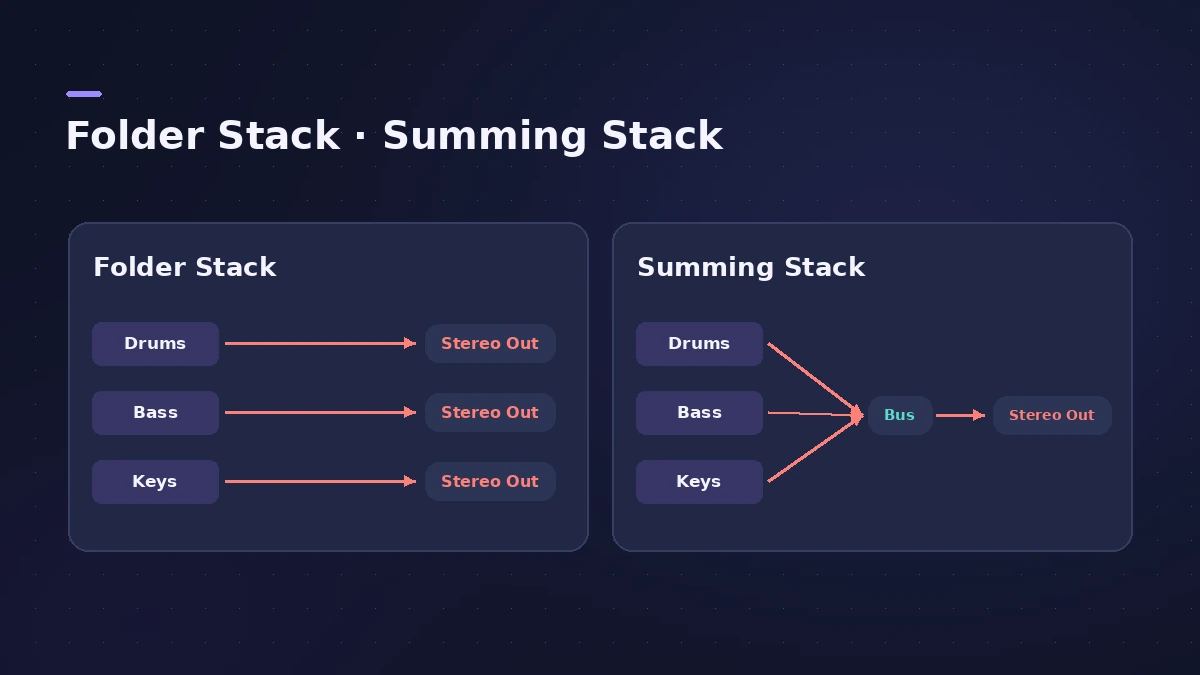
Track Stacks fold several tracks under one main track. A **Folder Stack** organises and controls them together without changing their routing. A **Summing Stack** sends all of them to one bus, so the main track works like a group channel you can EQ and compress. Both keep big projects readable.
 Owen Hartley

Where to find it
Track > Create Track Stack
Which stack when?
| Folder Stack | Summing Stack | |
|---|---|---|
| Changes routing | No | Yes — subtracks go to a bus |
| Process the group with plug-ins | No | Yes, on the main track |
| Mute/solo the group | Yes | Yes |
| Export as one stem | — | Yes — see export stems |
A Summing Stack is the quickest way to set up parallel compression on a drum kit.
Step by step
-
1
Check your version
In Logic Pro 12 and later every feature is always available. In Logic Pro 11 and earlier, Apple says Track Stacks need Enable Complete Features in Logic Pro > Settings > Advanced.
-
2
Select the tracks
Select the tracks to group. They can be next to each other or spread out — Logic Pro moves them together.
-
3
Create the stack
Choose Track > Create Track Stack, then select Folder Stack or Summing Stack and click OK.
-
4
Open and close it
Click the disclosure arrow next to the main track's icon. Option-click it to show or hide every stack in the project.
-
5
Add or remove tracks
Drag a track header between two subtracks to add it, or drag a subtrack out above the main track or below the last subtrack to remove it.
Common mistakes
- Expecting a Folder Stack to process audio — it doesn't change routing.
- Forgetting that adding a track to a Summing Stack reroutes it to the stack's aux.
Nesting stacks
Apple's current guide says you can nest a stack of either type inside another. Summing Stacks can also be saved as patches with all their subtracks and plug-ins, and Logic Pro includes factory patches built this way.
Sources
- Apple — Logic Pro User Guide: Create and edit track stacks in Logic Pro for Mac
- Apple — Logic Pro X 10.1 Help: Track Stacks overview (old)
- Apple — Logic Pro User Guide: What's new in Logic Pro for Mac 12
Checked November 2026. Logic ProFiles is independent of Apple; menu names can differ slightly between Logic Pro versions.
Frequently asked questions
What is the difference between a folder stack and a summing stack?
+
A folder stack groups tracks for organising and overall control without changing their outputs. A summing stack routes the subtracks to a bus whose aux is the main track, so you can process them as a group.
Can I export Track Stacks as stems?
+
Summing Stacks can be exported as stems because they sum audio on a bus. See our stems guide for the steps.
Related
- Mixer groups in Logic ProCreate Mixer groups in Logic Pro to link volume, pan, mute, solo, sends and editing across tracks, choose what each group links, and switch groups off.
- VCA faders in Logic ProUse VCA faders in Logic Pro to control many tracks' levels without an audio bus: create a VCA for selected strips, keep post-fader sends in step, automate it.
- Drum Machine Designer in Logic ProBuild an electronic kit in Logic Pro's Drum Machine Designer: clear the pads, drag samples on, set notes, process each pad on its own channel strip.
- Aux sends and buses in Logic ProSet up aux sends in Logic Pro: send several tracks to one reverb on a bus, choose pre fader, post fader or post pan, and use Sends on Faders for headphones.
- Parallel compression in Logic Pro — two easy methodsDo parallel compression in Logic Pro two ways: with the Compressor's Mix knob on the track, or by sending drums to an aux with a heavily compressed Compressor.
- How to export stems from Logic ProExport every Logic Pro track as its own audio file for a mixer: All Tracks as Audio Files, the right options for effects, tails and naming, and Track Stacks.
- Mix and master in Logic ProMix and master songs in Logic Pro with stock tools: vocal tuning, EQ, compression, sends, automation, Mastering Assistant, LUFS targets and Dolby Atmos.