Buffer latency calculator
Pick an I/O buffer size and a sample rate to see how many milliseconds of delay the buffer adds. Smaller buffers mean less delay while you record, but more work for your Mac.
 Owen Hartley
The formula
One buffer (ms) = buffer size (samples) ÷ sample rate (Hz) × 1000
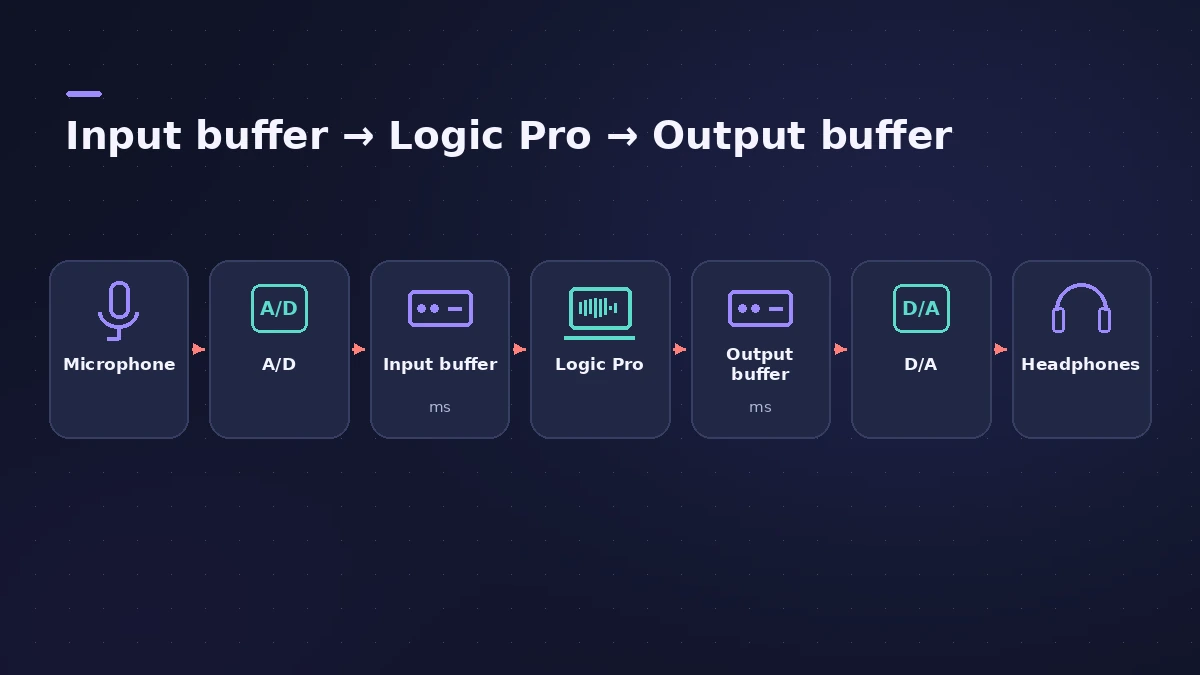
Audio passes through an input buffer on the way in and an output buffer on the way out, so the buffer part of your monitoring delay is roughly twice that figure.
| Buffer | 44.1 kHz | 48 kHz | 96 kHz |
|---|---|---|---|
| 32 samples | 0.73 ms | 0.67 ms | 0.33 ms |
| 64 samples | 1.45 ms | 1.33 ms | 0.67 ms |
| 128 samples | 2.90 ms | 2.67 ms | 1.33 ms |
| 256 samples | 5.80 ms | 5.33 ms | 2.67 ms |
| 512 samples | 11.61 ms | 10.67 ms | 5.33 ms |
| 1024 samples | 23.22 ms | 21.33 ms | 10.67 ms |
One buffer, rounded to two decimals.
Where to change it in Logic Pro
Choose Logic Pro > Settings > Audio, click Devices, then choose a value from the I/O Buffer Size pop-up menu. Logic Pro shows the resulting roundtrip latency under the menu — that figure includes your interface's converters and driver, so it is higher than this calculator's buffer-only number.
Recording vs mixing
Apple's advice is to lower the I/O buffer size while recording and raise it again for mixing: a larger buffer reduces the load on your Mac but increases latency. If a small buffer causes system overload alerts, step it up one setting at a time — see system overload and latency. Doubling the sample rate halves the buffer time, but larger files and plug-ins working at the higher rate load your Mac more.
Planning the size of the recordings themselves? Use the audio file size calculator.
Sources
- Apple Support — Manage input monitoring latency in Logic Pro for Mac
- Apple Support — Avoid system overloads in Logic Pro for Mac
- Packt — Logic Pro: Setting preferences (I/O buffer range)
Checked November 2026. Logic ProFiles is independent of Apple; menu names can differ slightly between Logic Pro versions.
Frequently asked questions
What buffer size should I use for recording in Logic Pro?
+
The lowest setting that plays without clicks or system overload alerts. Apple suggests a small buffer while recording and a larger one while mixing.
How do I calculate buffer latency?
+
Divide the buffer size in samples by the sample rate and multiply by 1000. 128 samples at 48 kHz is 2.67 ms per buffer.
Why is Logic Pro's roundtrip latency higher than this calculator?
+
The roundtrip figure also includes the converters and the audio driver's own buffers. This calculator shows the buffer part only.
Related
- Choosing an audio interface for Logic ProWhat to look for in an audio interface for Logic Pro: class-compliant drivers, enough inputs, phantom power for condenser mics, direct ports and latency.
- Samples to milliseconds calculatorConvert samples to milliseconds and milliseconds to samples at any sample rate — useful for recording offsets, latency figures and sample delay settings.
- Logic Pro latency — how to fix delay when recordingHearing a delay when you record in Logic Pro? Lower the I/O buffer, turn on Low Latency Monitoring Mode, use direct monitoring and avoid Bluetooth headphones.
- Logic Pro system overload — how to find the cause and fix itLogic Pro says System Overload? Use the Performance Meter to see if CPU or disk is the cause, then fix it with the buffer, freezing and Sampler settings.
- Audio file size calculatorWork out the size of a WAV or AIFF bounce, or a folder of stems, from length, sample rate, bit depth and channels — plus the size at MP3 or AAC bit rates.
- Audio calculatorsFree audio calculators for Logic Pro: buffer latency, file size, BPM to delay time, bars to time, tempo change, samples to ms and note frequency.