Plug-ins
Distortion and Bitcrusher in Logic Pro
Logic Pro's distortion effects simulate the distortion of vacuum tubes, transistors and digital circuits. The set includes Bitcrusher, Clip Distortion, Distortion, Distortion II, Overdrive and Phase Distortion — and Bitcrusher is the go-to for lo-fi, early-digital sounds.
 Owen Hartley

Where to find it
Audio Effect slot > Distortion > Bitcrusher
Logic Pro's distortion plug-ins
The Distortion menu holds Bitcrusher, Clip Distortion, Distortion, Distortion II, Overdrive and Phase Distortion. Bitcrusher is the digital, lo-fi option; the others cover different analog-style distortion characters, so audition them on the part.
For guitar-specific distortion, Logic Pro also has pedal and amp models; see recording electric guitar.
Bitcrusher clip modes
| Mode | Result |
|---|---|
| Clip | Abrupt distortion above the clip level |
| Wrap | Moderately severe distortion by offsetting levels above the threshold |
| Fold | A third way of treating peaks above the clip level |
Step by step
-
1
Insert Bitcrusher
Choose Distortion > Bitcrusher on a drum loop, synth or bus.
-
2
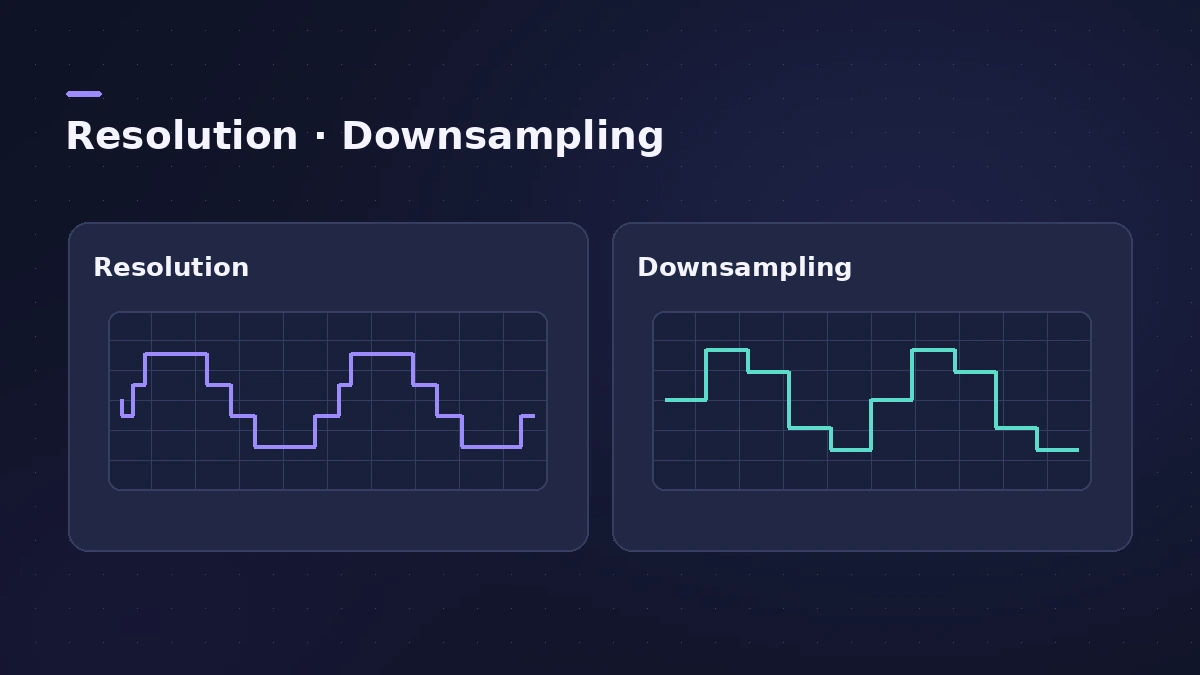
Lower the Resolution
Set the bit resolution between 1 and 24 bits; lower values add more sampling errors and distortion.
-
3
Add Downsampling
Raise Downsampling to divide the sample rate — it adds aliasing without changing playback speed or pitch.
-
4
Set Drive and clip mode
Drive pushes the input; the clip mode (Clip, Wrap or Fold) decides what happens to peaks above the clip level.
-
5
Automate for transitions
Automate Resolution and Downsampling to crush a section gradually, for example before a drop.
Common mistakes
- Very low resolution at full level — the distortion can be louder than the signal.
- Forgetting that more Drive also means more clipping at the output.
- Crushing a whole mix when one part would do.
Parallel distortion
Put distortion on an aux and blend it in for grit without losing the clean signal — the same idea as parallel compression. For analog-style warmth, try ChromaGlow.
Sources
- Apple — Logic Pro for iPad User Guide: Distortion effects
- Apple — Logic Pro for iPad User Guide: Bitcrusher
- Apple — Logic Pro for iPad User Guide: Bitcrusher clip modes
- Apple — Logic Pro 9 Effects: Bitcrusher (old)
- MusicRadar — Logic Pro's secret weapons for creative effects
Checked November 2026. Logic ProFiles is independent of Apple; menu names can differ slightly between Logic Pro versions.
Frequently asked questions
What does Bitcrusher do?
+
It's a low-resolution digital distortion that emulates early digital devices, creates aliasing by dividing the sample rate, or distorts signals beyond recognition.
Does Downsampling change pitch?
+
No. It reduces the sample rate without changing playback speed or pitch.
Which distortion plug-ins does Logic Pro have?
+
Bitcrusher, Clip Distortion, Distortion, Distortion II, Overdrive and Phase Distortion, plus guitar pedal distortions.
Related
- How to make a lo-fi hip-hop beat in Logic ProMake a lo-fi hip-hop beat in Logic Pro: 70–90 BPM, jazzy seventh chords on Vintage Electric Piano, swung drums, then Bitcrusher and Tape Delay for texture.
- Pedalboard in Logic ProUse Pedalboard in Logic Pro: drag stompboxes from the Pedal Browser, set their order, split the signal into Bus A and Bus B with the Router and mix them back.
- ChromaGlow in Logic ProChromaGlow in Logic Pro adds analog-style warmth: what Retro Tube, Modern Tube, Magnetic, Squeeze and Analog Preamp do, their styles, Drive, Mix and filters.
- Phat FX in Logic ProPhat FX in Logic Pro is a colouring multi-effect: distortion, filters, compressor, bass enhancer and Mod FX in a chain you can reorder, plus an XY pad and LFOs.
- Parallel compression in Logic Pro — two easy methodsDo parallel compression in Logic Pro two ways: with the Compressor's Mix knob on the track, or by sending drums to an aux with a heavily compressed Compressor.
- How to record electric guitar in Logic ProRecord electric guitar into Logic Pro: use the Hi-Z input, tune with the Tuner, pick an Amp Designer and Pedalboard tone and keep latency low.