Instruments
Vocoder in Logic Pro — EVOC 20 PolySynth
EVOC 20 PolySynth is a vocoder and polyphonic synth in one. It listens to a voice arriving through a side chain and imposes its character on the synth you play — the classic singing-robot sound. You need three things at once: a voice, the side chain set to it and MIDI notes.
 Owen Hartley

Where to find it
Instrument slot > Synthesizer > EVOC 20 PolySynth
How a vocoder works
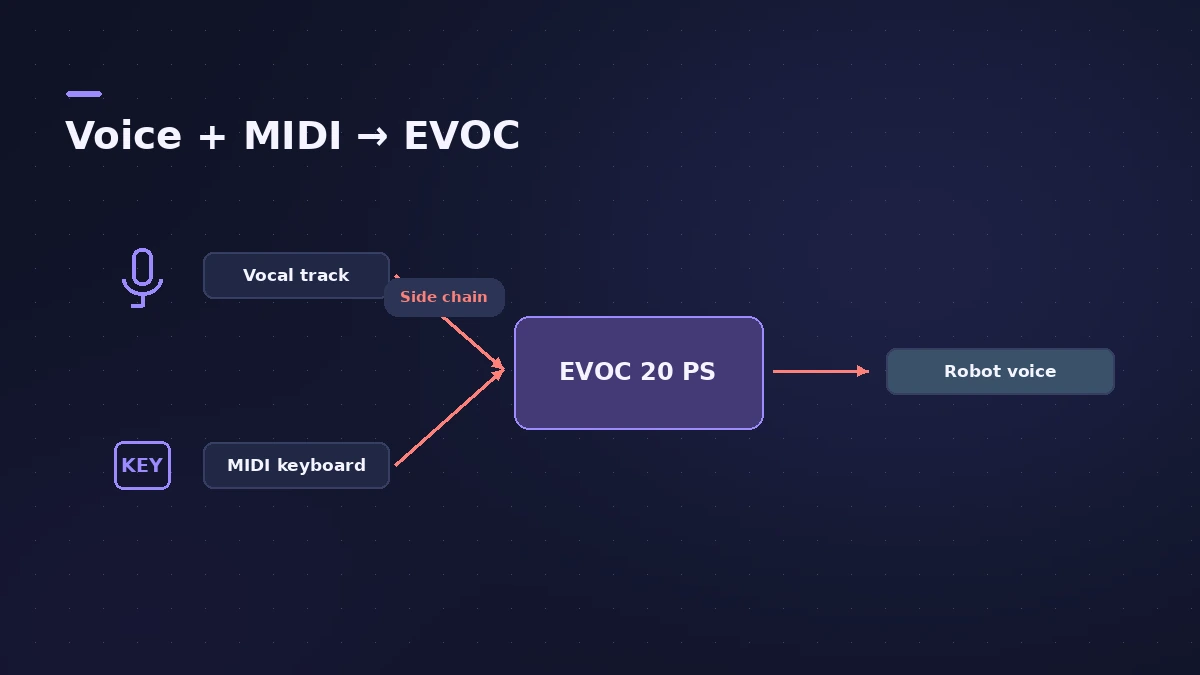
The voice goes through an analysis filter bank that splits it into bands, and each band controls the matching band of a synthesis filter bank on the synth. More bands mean the voice's character comes through more precisely.
Key EVOC 20 PolySynth controls
| Control | What it does |
|---|---|
| Side Chain (header) | The audio track, input or bus used as the voice |
| Bands | Number of filter bands, up to 20 |
| Attack / Release | How fast each band follows rising and falling levels |
| Freeze | Holds the current analysis spectrum |
| Synthesizer section | The polyphonic synth that is "spoken" through |
| Un/Voiced detection | How consonants and vowels are handled |
Tips for clearer words
Apple's tips: play the synth legato so it never breaks, enunciate the speech, don't overdrive the vocoder, and a longer synthesis Release can smooth gaps.
Step by step
-
1
Record or route the voice
Put a clean vocal or spoken part on an audio track — or use a live input or bus. Speak clearly; Apple's tips say enunciation helps.
-
2
Load EVOC 20 PolySynth
Create a software instrument track and insert EVOC 20 PolySynth in the Instrument slot.
-
3
Set the side chain
Choose the vocal track, input or bus from the Side Chain menu in the plug-in header.
-
4
Play chords
Mute the vocal track if you like, start playback and play or record notes on the EVOC track. The words come from the voice, the notes from your keyboard.
-
5
Improve intelligibility
Raise Bands (up to 20) for a more precise result, and adjust Attack and Release in the analysis section for the most articulated sound.
-
6
Freeze sustained vowels
Turn on Freeze to hold the current spectrum through gaps between words while the synth keeps playing.
Common mistakes
- Hearing silence because one of the three parts is missing — voice, side chain or MIDI notes.
- Playing short, detached notes — breaks in the synth signal stop the vocoder output; play legato.
- Overdriving the vocoder input, which easily distorts.
Other vocal effects
To shift pitch and formants of a voice without a keyboard, use Vocal Transformer. For tuning, see Pitch Correction. To play the EVOC part, connect a MIDI keyboard.
Sources
- Apple — Logic Pro X 10.4 Help: EVOC 20 PolySynth overview (old)
- Apple — Logic Pro 9 Instruments: EVOC 20 PolySynth (old)
- Apple — Logic Pro for iPad User Guide: EVOC 20 PolySynth
- Apple — Logic Pro for iPad User Guide: EVOC 20 PS sidechain analyser
- Apple — Logic Pro for iPad User Guide: Enhance speech intelligibility in EVOC 20 PS
- Apple — MainStage 2 Instruments: EVOC 20 PolySynth sidechain analysis (old)
Checked November 2026. Logic ProFiles is independent of Apple; menu names can differ slightly between Logic Pro versions.
Frequently asked questions
Does Logic Pro have a vocoder?
+
Yes — EVOC 20 PolySynth, a vocoder combined with a polyphonic synth, under Synthesizer in the Instrument slot.
Why is my Logic Pro vocoder silent?
+
Check that a voice is playing, that it's chosen in EVOC's Side Chain menu and that MIDI notes reach the EVOC track at the same time.
How many bands does EVOC 20 have?
+
Up to 20 bands per filter bank; more bands reproduce the voice more precisely.
Related
- ES1 in Logic ProLearn Logic Pro's ES1 synth: oscillator and sub-oscillator, filter, envelopes, glide and LFO — a simple subtractive synth for analog basses, leads and plucks.
- EFM1 FM synth in Logic ProProgram Logic Pro's EFM1 FM synth: set the carrier and modulator ratio, shape FM depth with its envelope, and get bells, electric pianos and punchy basses.
- Vocal Transformer in Logic ProUse Vocal Transformer in Logic Pro to shift a voice's pitch without changing its character, move formants for deep or tiny voices, double a vocal and Robotize.
- Pitch Correction plug-in in Logic ProAuto-tune vocals with Logic Pro's Pitch Correction plug-in: set Root and Scale, adjust Response for natural or hard tuning, bypass notes and use Global Tuning.
- How to record MIDI with a keyboard in Logic ProRecord MIDI from a keyboard in Logic Pro: arm an instrument track, record with a count-in, overdub, replace or take passes in Cycle mode, then quantize.
- How to sidechain in Logic ProSet up sidechain compression in Logic Pro: put Compressor on the bass or pad, pick the kick in the Side Chain menu, then set threshold, ratio, attack, release.
- Instruments in Logic ProGuides to Logic Pro's instruments: Session Players, Drummer, Synth Players, Chord ID, Drum Machine Designer, Sampler, Step Sequencer and Play Surface.