Gear
Control surfaces in Logic Pro
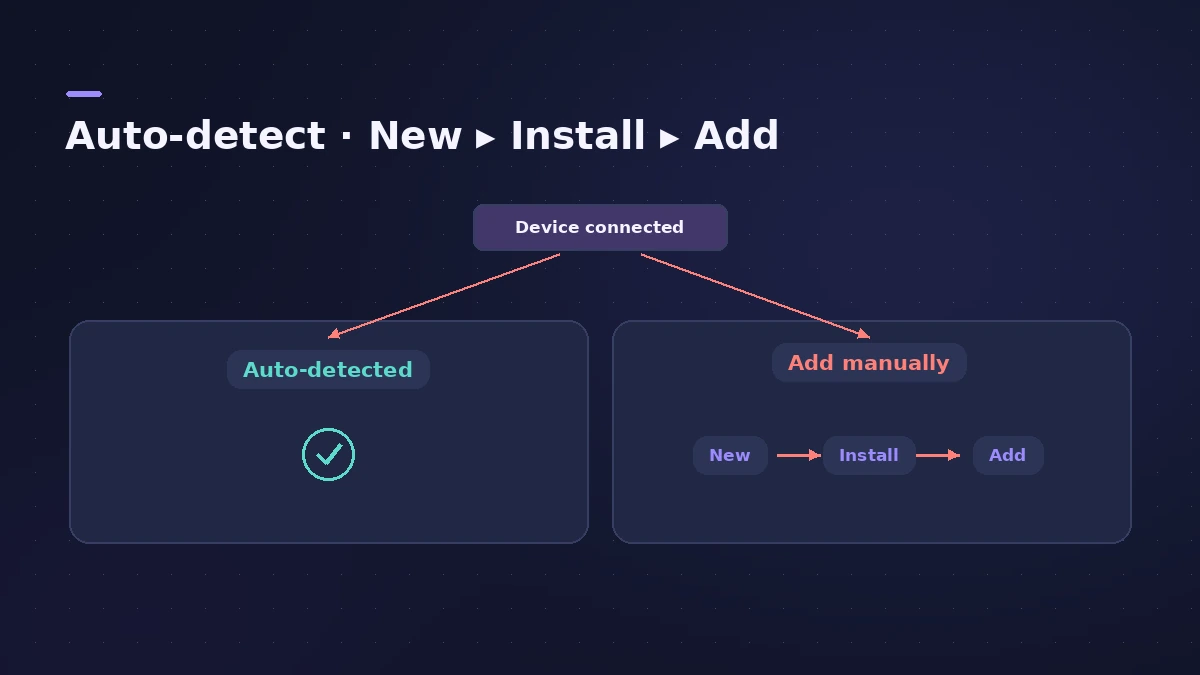
A control surface puts Logic Pro's faders, transport and automation under your fingers. Apple documents each supported family in its Control Surfaces Support Guide: Mackie Control units are detected automatically, HUI devices need adding by hand, and Avid's EuCon surfaces work through their own software.
 Owen Hartley

Where to find it
Logic Pro > Control Surfaces > Setup
Detected or added by hand
For the most common protocol, see Mackie Control and HUI in Logic Pro. No hardware? An iPad with Logic Remote does much of the same job for free.
Step by step
-
1
Connect and power the device
Connect the surface to your Mac and switch it on before opening Logic Pro.
-
2
Let Logic Pro find it
A powered Mackie Control is detected automatically when Logic Pro opens, and works with default settings.
-
3
Add it manually if needed
For devices that aren't scanned (such as HUI), choose Logic Pro > Control Surfaces > Setup, then New > Install, select the model and click Add.
-
4
Set the MIDI ports
For manually added devices, assign the MIDI In and Out ports in the Setup window.
-
5
Install the maker's software for EuCon
Avid/Euphonix EuCon surfaces use the EuControl app and don't appear in the Setup window.
Common mistakes
- Assuming every emulation works: Apple says surfaces that emulate HUI but aren't in its guide aren't supported or guaranteed to work.
- Using a one-way MIDI connection: Apple says HUI devices must be connected bidirectionally with the Mac, using a MIDI interface.
Which families Apple documents
The guide covers Mackie Control (and devices in Mackie Control emulation mode), Mackie HUI and Baby HUI, Avid/Euphonix EuCon, Novation Launchpad, Korg microKONTROL and KONTROL49, M-Audio iControl and Yamaha DM2000, among others.
Sources
- Apple — Control Surfaces Support Guide for Logic Pro (PDF)
- Apple — Control Surfaces Support Guide for Logic Pro (contents)
- Apple — Control Surfaces Support Guide: Overview of the Mackie Control
- Apple — Control Surfaces Support Guide: Set up your Mackie HUI
- Apple — Control Surfaces Support Guide: Set up your Euphonix/Avid device
- Apple — Control Surfaces Support Guide: Set up your Novation Launchpad
Checked November 2026. Logic ProFiles is independent of Apple; menu names can differ slightly between Logic Pro versions.
Frequently asked questions
Does Logic Pro support Mackie Control?
+
Yes. A powered Mackie Control is detected automatically, and devices with a Mackie Control emulation mode are covered too.
Where are control surface settings in Logic Pro?
+
In Logic Pro > Control Surfaces > Setup.
Can I remap a control surface?
+
For devices supported by Lua scripts, Apple says you can remap controls, or use Smart Controls mapping.
Related
- Choosing a MIDI keyboard controller for Logic ProWhat to look for in a MIDI keyboard for Logic Pro: class-compliant USB, automatic Smart Controls mapping, control surface support, MPE and Bluetooth MIDI.
- Assign a MIDI controller in MainStageAssign your MIDI controller's knobs, faders and buttons in MainStage with Learn: select a control, click Assign & Map, move it — press buttons three times.
- Mackie Control and HUI controllers in Logic ProSet up a Mackie Control or HUI controller in Logic Pro: Mackie units are detected automatically; add HUI in Control Surfaces > Setup with both MIDI ports.
- Use a Launchpad with Logic Pro Live LoopsControl Logic Pro Live Loops with a Novation Launchpad: Apple supports it in the Control Surfaces guide for triggering cells, scenes and mixing parameters.
- Logic Remote — control Logic Pro from an iPad or iPhoneLogic Remote is Apple's free app that turns an iPad or iPhone into a Logic Pro mixer, transport and Touch Instrument. Connect over Wi-Fi or USB in a few taps.
- Gear for Logic ProGear for Logic Pro in 2026: which Mac or MacBook to buy, how much RAM you need, moving the Sound Library to an SSD, control surfaces, Logic Remote and Sidecar.