Workflows
How to make synthwave in Logic Pro
Synthwave rebuilds 1980s production: warm analog-style synths, a running arpeggio, a steady bass and a huge snare whose reverb stops dead. Retro Synth, the Arpeggiator and a gated reverb aux get you there.
 Owen Hartley

Where to find it
Retro Synth + Arpeggiator
The four core parts
| Part | Logic Pro tool |
|---|---|
| Chorused pads and leads | Retro Synth |
| Arpeggio | Arpeggiator MIDI plug-in |
| Gated drums | Reverb + Noise Gate on an aux |
| Steady bass | Retro Synth or a Synth Bass Player |
Step by step
-
1
Set the tempo
Synthwave is broadly mid-paced, around 80–118 BPM.
-
2
Make a pad
Load Retro Synth with the Analog engine and play wide minor chords.
-
3
Add an arpeggio
Insert the Arpeggiator in front of a second Retro Synth and hold the chords to get a running 8th- or 16th-note line.
-
4
Lay a steady bass
Program a simple, driving bass that keeps going under the chords.
-
5
Build the gated snare
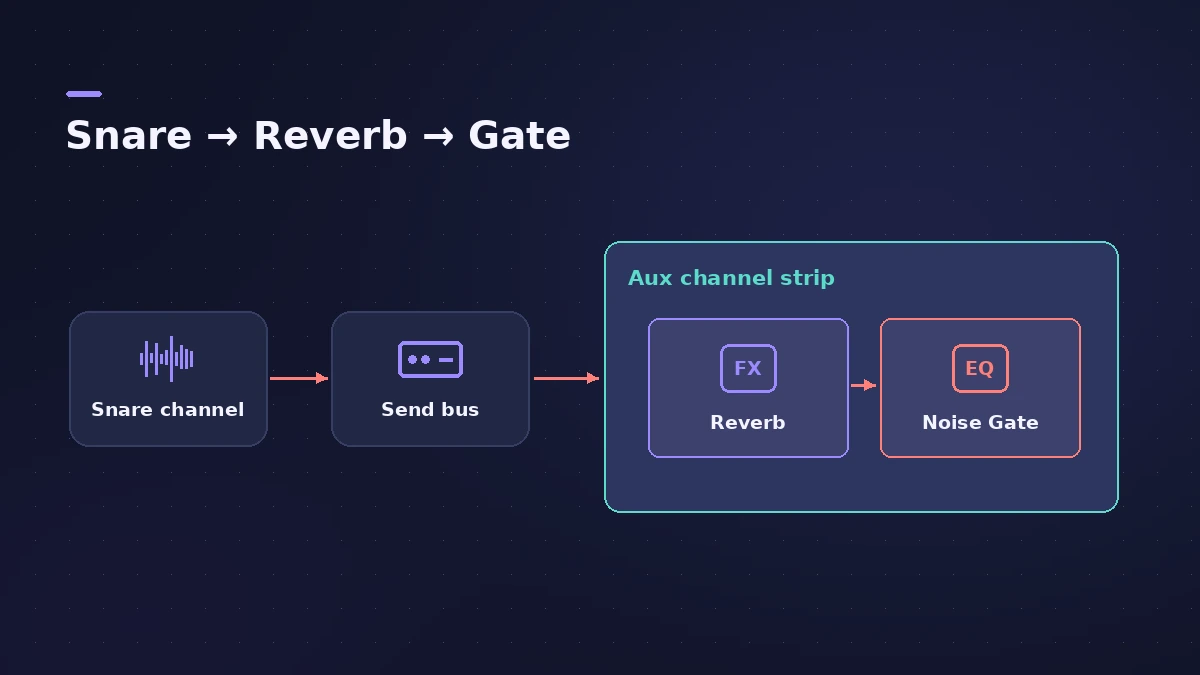
Create an aux with a big reverb followed by Noise Gate, and send the snare to it so the tail cuts off abruptly.
-
6
Add chorus and delay
Use chorus on synths and tempo-synced delay on leads for the 80s sheen.
Common mistakes
- Reverb tail too long: The point of the gated sound is the sudden stop; tighten the gate.
- Gate on the dry snare: Put reverb then gate on an aux so the snare's attack stays intact.
Tools
See Retro Synth, the Arpeggiator and Noise Gate.
Sources
- Orphiq — What is synthwave?
- eMastered — How to make synthwave
- Mubert — Synthwave history and how to make it
Checked November 2026. Logic ProFiles is independent of Apple; menu names can differ slightly between Logic Pro versions.
Frequently asked questions
What BPM is synthwave?
+
Typically around 80–118 BPM.
How do I make a gated reverb snare in Logic Pro?
+
Send the snare to an aux with a reverb followed by a noise gate, so the reverb tail cuts off abruptly.
Related
- Retro Synth in Logic ProRetro Synth in Logic Pro explained: a 16-voice synth with Analog, Sync, wavetable and FM engines, which engine to pick for leads, pads, basses and bells.
- Arpeggiator in Logic ProTurn chords into arpeggios with Logic Pro's Arpeggiator MIDI plug-in: set note order, rate and octaves, use Latch, build a 16-step grid and record the output.
- Noise Gate in Logic ProUse Noise Gate in Logic Pro to cut bleed and noise: set Threshold and Reduction, shape Attack, Hold and Release, filter the side chain, or use Ducker mode.
- ChromaVerb in Logic ProSet up ChromaVerb in Logic Pro: choose one of 14 room types, shape decay with the Damping EQ, set size, density and predelay, use Freeze and the output EQ.
- Logic Pro workflowsStep-by-step Logic Pro workflows by genre — house, techno, drum and bass, lo-fi, synthwave, orchestral, rock — plus beats, film scoring and podcasts.