Plug-ins
ChromaVerb in Logic Pro
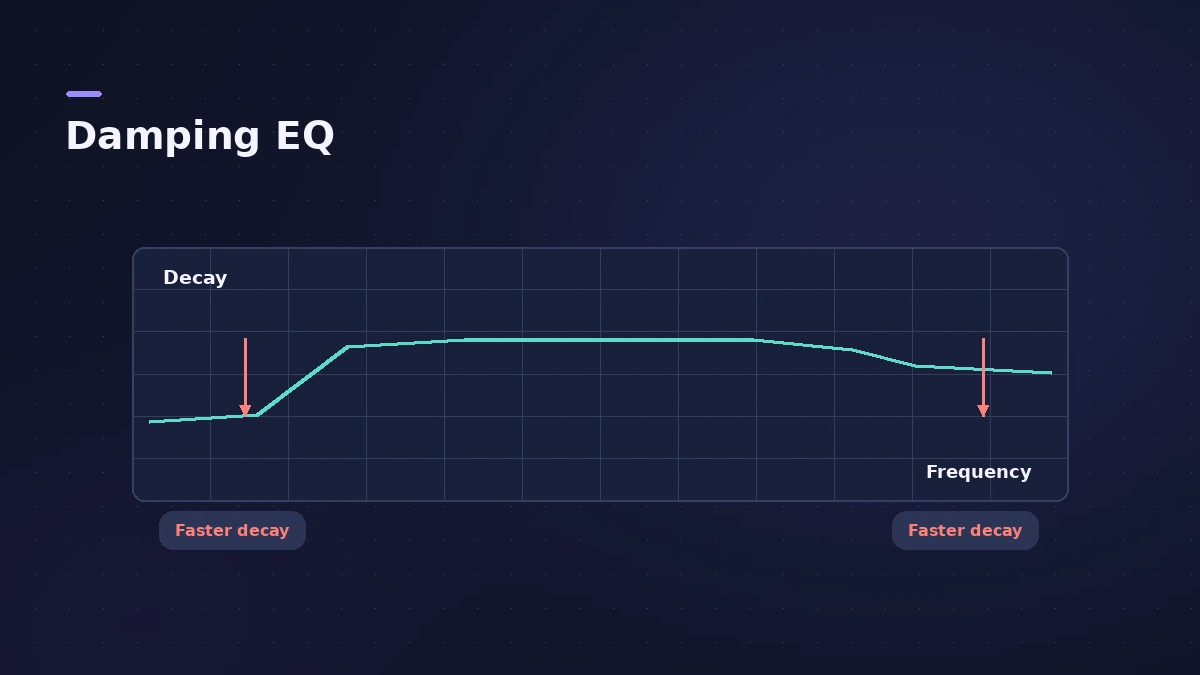
ChromaVerb is Logic Pro's modern algorithmic reverb, added in 10.4. It offers 14 room types, a Damping EQ that shows how each frequency decays, tempo-synced controls and a Freeze button that holds the reverb forever.
 Owen Hartley

Where to find it
Audio Effect slot > Reverb > ChromaVerb (usually on an aux)
Room types
ChromaVerb's 14 room types include Room, Chamber, Concert Hall, Theatre, Dense Room, Smooth Space, Reflective Hall, Strange Room, Synth Hall, Digital, Dark Room, Vocal Hall, Bloomy and Airy. Some parameters behave differently per type: in several rooms Attack raises the level over time, while in others it sets how long the reverb takes to reach full density.
ChromaVerb on drums, vocals and pads
Sound On Sound found Dense and Strange Room well suited to wide, modulated pad reverbs, and suggests Chamber with a tempo-synced predelay for a slapback effect. For more on choosing between Logic's reverbs, see which reverb to use.
Step by step
-
1
Insert ChromaVerb
Choose Reverb > ChromaVerb in an Audio Effect slot — usually on an aux fed by sends from several tracks.
-
2
Pick a room type or preset
Choose one of the 14 room types, or a preset that already sets the damping and output EQ.
-
3
Set the main controls
Adjust Attack, Size, Density, Distance and Decay; turn on Decay sync to lock decay to the tempo.
-
4
Shape the decay with the Damping EQ
Drag points to change which frequencies decay faster — for example, shorten the low end so the reverb stays clear.
-
5
Finish in the Details view
Use the output EQ to trim the lows and highs of the reverb, and set Width and Modulation.
Common mistakes
- Leaving a long low-frequency decay, so the mix gets muddy.
- Putting a separate ChromaVerb on every track instead of a shared aux.
- Forgetting Freeze is on after automating it.
Freeze for pads
Freeze recirculates the signal inside the room forever — automate it for infinite pads. For realistic spaces from recordings, see Space Designer.
Sources
- Apple Support — Use ChromaVerb in Logic Pro for Mac and MainStage
- Apple — Logic Pro for iPad User Guide: ChromaVerb
- Apple — Logic Pro for iPad User Guide: ChromaVerb main parameters
- Apple — Logic effects in Final Cut Pro: ChromaVerb main window controls
- Sound On Sound — Using ChromaVerb in Logic (Jun 2018)
- MusicTech — Using ChromaVerb in Logic Pro X
Checked November 2026. Logic ProFiles is independent of Apple; menu names can differ slightly between Logic Pro versions.
Frequently asked questions
How many room types does ChromaVerb have?
+
Fourteen, from dense rooms to wide spaces and large halls.
What is the Damping EQ in ChromaVerb?
+
A curve that sets how quickly different frequencies decay in the reverb.
When was ChromaVerb added?
+
In Logic Pro 10.4.
Related
- How to make ambient music in Logic ProMake ambient music in Logic Pro: slow tempos, evolving Alchemy pads, Sample Alchemy textures from your own recordings, and long ChromaVerb reverbs.
- How to make synthwave in Logic ProMake synthwave in Logic Pro: 80–118 BPM, Retro Synth pads, an Arpeggiator line and a gated reverb snare built from a reverb aux followed by Noise Gate.
- Space Designer in Logic ProUse Space Designer, Logic Pro's convolution reverb: load a sampled IR or synthesize one, set length, predelay and spread, and load your own impulse responses.
- Quantec Room Simulator in Logic ProThe Quantec Room Simulator in Logic Pro 11.1 and later: the QRS and YardStick models, Room Size, Reverb Time, Freeze, Enhance and the AD/DA converter emulation.
- Which Logic Pro reverb should you use?Compare Logic Pro's reverbs — ChromaVerb, Space Designer, Quantec Room Simulator, SilverVerb and EnVerb — and see which one fits vocals, drums, pads or low CPU.
- Aux sends and buses in Logic ProSet up aux sends in Logic Pro: send several tracks to one reverb on a bus, choose pre fader, post fader or post pan, and use Sends on Faders for headphones.