Recording
Mono or stereo tracks in Logic Pro
The rule is simple: count the outputs. One mic or one cable is a mono source and goes on a mono track; a keyboard with left and right outputs or a pair of mics goes on a stereo track. A mono track still plays in both speakers and can be panned anywhere.
 Owen Hartley

Where to find it
Channel strip input format button
Mono or stereo by source
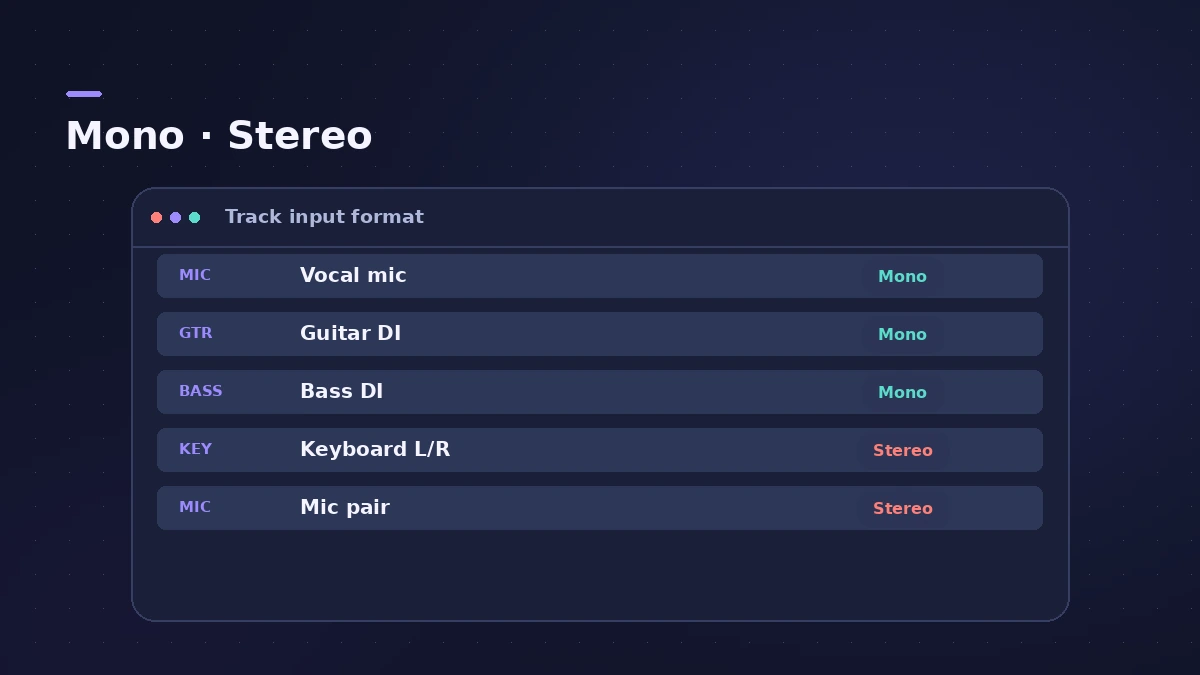
| Source | Track |
|---|---|
| Vocal mic, one guitar mic | Mono |
| Guitar or bass DI | Mono |
| Keyboard or synth with L/R outs | Stereo |
| Two mics as a stereo pair | Stereo, or two mono tracks |
Step by step
-
1
Count the outputs
Most guitars and basses have one output; keyboards and synths mostly have two, labelled left and right.
-
2
Mono for one source
For one mic or one cable, set the track to mono (one circle) with a single input.
-
3
Stereo for pairs
For L/R outputs or two mics making a stereo image, use a stereo track on an input pair.
-
4
Or two mono tracks
Two mics on one source can also go to two mono tracks, so you can EQ and pan each separately.
-
5
Switch the format
Click the format button to switch mono and stereo; click-hold to choose Left or Right.
Common mistakes
- Recording one mic on a stereo track and hearing it in one ear only.
- Recording vocals in stereo — a single mic on a singer is a mono signal.
Width without stereo tracks
Record a part twice on two mono tracks and pan them apart for width. To check how the mix holds up, see mono check.
Sources
- Focusrite — Should my DAW track be mono or stereo?
- Focusrite — Hearing audio in only one side when recording
- Recording Magazine — Mono signals and stereo tracks
- LANDR — Mono vs stereo: when to use each track type
- Apple — Logic Pro X 10.1 Help: Channel strip input formats (old)
Checked November 2026. Logic ProFiles is independent of Apple; menu names can differ slightly between Logic Pro versions.
Frequently asked questions
Should I record vocals in mono or stereo?
+
Mono. One mic on a singer gives a mono signal; there's no need for a stereo track.
Does a mono track only play in one speaker?
+
No. A mono track plays in both speakers by default and can be panned anywhere.
Related
- Logic Pro recording only on one sideMic or guitar only in the left ear in Logic Pro? Set the track to mono with the right input, or play one side of an old stereo take with Left format.
- Panning and pan law in Logic ProPan in Logic Pro the right way: Pan on mono strips, Balance or Stereo Pan on stereo strips, and pick a pan law — 0 dB, −3 dB or −3 dB compensated.
- How to check your mix in mono in Logic ProCheck a Logic Pro mix in mono: put Gain on the Stereo Out and turn on Mono, watch MultiMeter's Correlation meter, and fix weak parts with polarity or width.
- How to record piano in Logic ProRecord piano in Logic Pro: a stereo pair on an upright or grand, mono vs stereo tracks, phase checks, and a digital piano over MIDI or stereo line outs.
- Recording in Logic ProHow to record in Logic Pro: vocals, electric and acoustic guitar, bass, drums and MIDI, plus cycle takes, punch-in, Flashback Capture and step input.