Plug-ins
Auto Sampler in Logic Pro
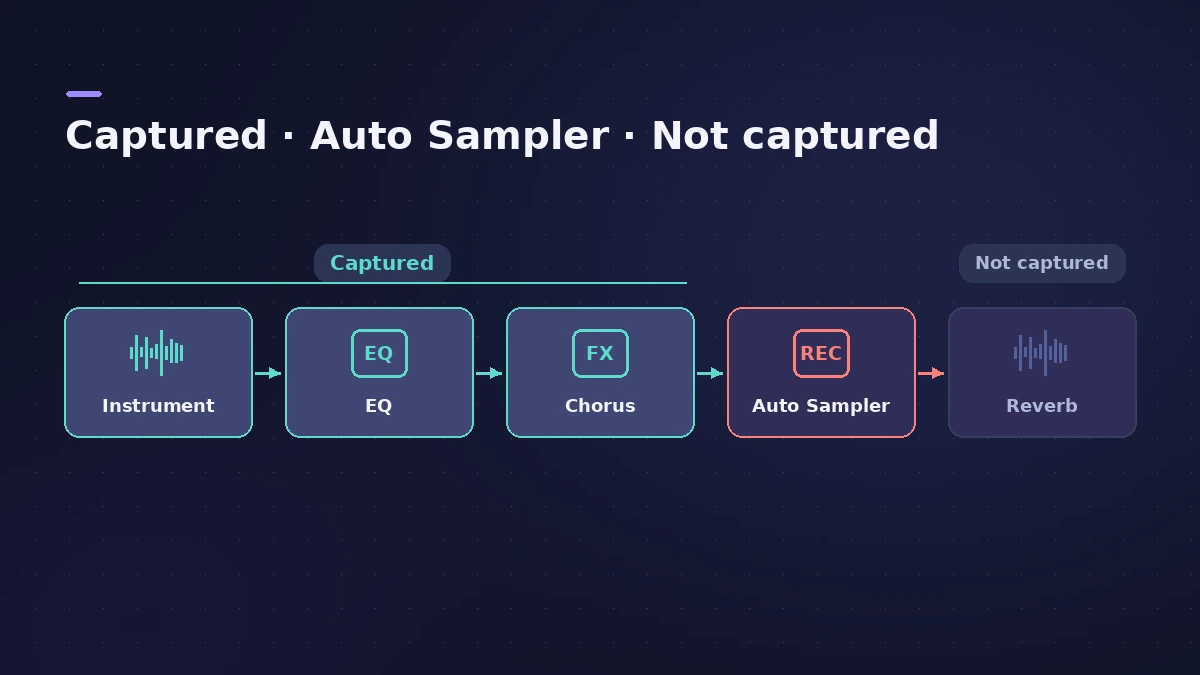
Auto Sampler plays notes into a synth, records each one and builds a Sampler instrument automatically. It works with a MIDI hardware synth, a software instrument or a stack of instruments and effects — anything before it in the channel strip ends up in the samples.
 Owen Hartley

Where to find it
Audio Effect slot of an instrument or External Instrument track > Utility > Auto Sampler
Auto Sampler settings
| Setting | What it decides |
|---|---|
| Key Range Start / End | Lowest and highest note sampled |
| Sample Every | Spacing between sampled notes |
| Velocity layers | How many dynamic levels are recorded |
| Sustain | How long each note is held |
| Auto Loop | Finds loop points for sustained sounds |
Sound On Sound points out that for analog synth sounds you may skip velocity layers and add velocity control of the filter in Sampler instead.
Step by step
-
1
Choose the source
For a software instrument, insert Auto Sampler on its channel strip. For a hardware synth, use an External Instrument track so Logic Pro can send MIDI and receive audio.
-
2
Check MIDI reaches the source
Click keys on Auto Sampler's onscreen keyboard and make sure the instrument sounds.
-
3
Set range and spacing
Adjust Key Range Start and End and Sample Every to decide which notes are recorded.
-
4
Set sustain, velocity and looping
Set how long notes are held, add velocity layers if the sound changes with playing strength, and choose an auto-loop option for sustained sounds.
-
5
Click Sample
Name the instrument and click Start. It's saved to Audio Music Apps > Sampler Instruments > AutoSampled Instruments.
Common mistakes
- Putting effects after Auto Sampler and expecting them in the samples — only plug-ins before it are captured.
- Leaving a hardware synth's reverb or delay on, so every sample carries the tail.
- Sampling a short pluck with a long Sustain, wasting time and space.
Play and edit the result
The finished instrument opens in Sampler, where you can add filter and velocity control. For a single sound, Quick Sampler is faster.
Sources
- Apple — Logic Pro User Guide: Create a sampler instrument with Auto Sampler
- Apple — Logic Pro User Guide: Work with AutoSampled instruments
- Apple — MainStage User Guide: Auto Sampler overview
- Apple — MainStage User Guide: Auto Sampler (sources)
- Sound On Sound — Logic: Using Auto Sampler (Mar 2021)
- Berklee Library — Logic Auto Sampler: Sampling a hardware synthesizer
Checked November 2026. Logic ProFiles is independent of Apple; menu names can differ slightly between Logic Pro versions.
Frequently asked questions
Where does Logic Pro save Auto Sampler instruments?
+
By default in Audio Music Apps > Sampler Instruments > AutoSampled Instruments.
Can I sample a whole stack of instruments?
+
Yes. Sound On Sound notes Auto Sampler can trigger an external synth, a software instrument or a Track Stack of several instruments.
Related
- How to record a hardware synth in Logic ProPlay and record hardware synths in Logic Pro: External Instrument for MIDI out and audio in, latency compensation and printing the synth to an audio track.
- Sampler in Logic ProBuild a multisampled instrument with Logic Pro's Sampler: drag in samples, choose a mapping, edit zones and groups, and open old EXS24 instruments in Sampler.
- Quick Sampler in Logic ProTurn one sound into an instrument with Quick Sampler in Logic Pro: what Classic, One Shot, Slice and Recorder modes do, and when to use Sampler instead.
- How to record MIDI with a keyboard in Logic ProRecord MIDI from a keyboard in Logic Pro: arm an instrument track, record with a count-in, overdub, replace or take passes in Cycle mode, then quantize.
- Track Stacks in Logic Pro — folder vs summing stacksGroup tracks in Logic Pro with Track Stacks: when to use a Folder Stack or a Summing Stack, how to create, nest and open them, and why summing stacks are buses.
- Plug-ins in Logic ProGuides to Logic Pro's stock plug-ins: Compressor, EQs, limiters, Pitch Correction, Amp Designer, Pedalboard, ChromaGlow, ChromaVerb, Space Designer and delays.