MainStage & Live
Play backing tracks in MainStage
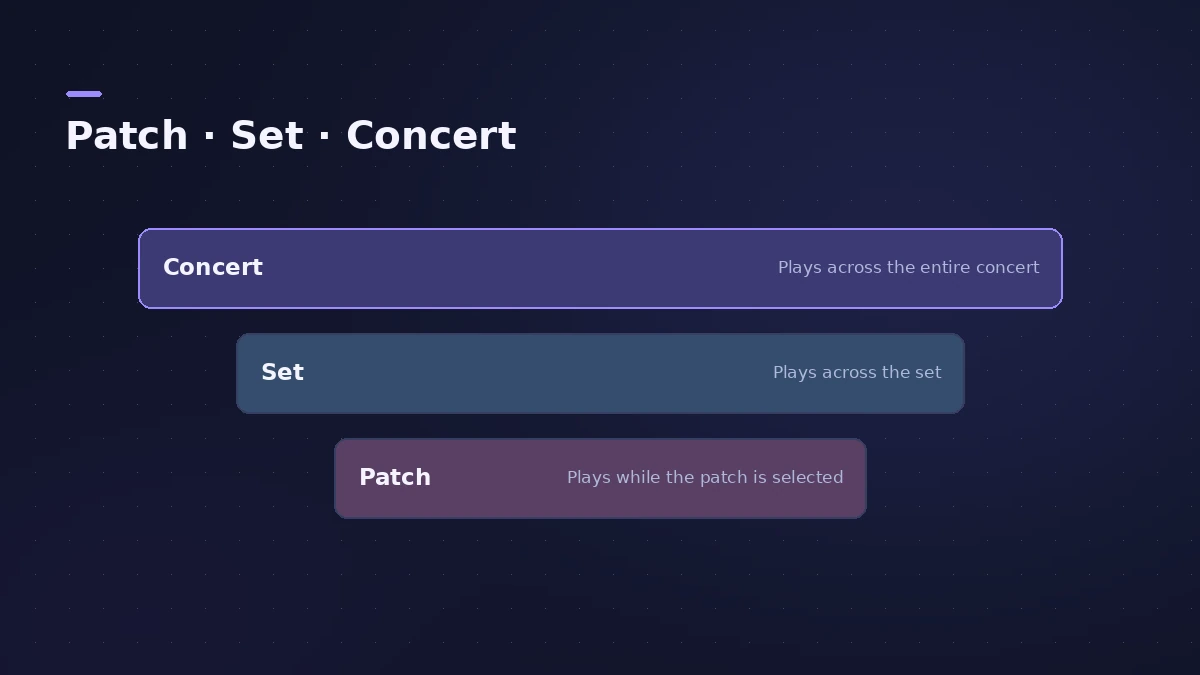
The Playback plug-in plays backing tracks or other audio files while you perform. Where you put it decides how it behaves: in a patch it plays only while that patch is selected, while at the set or concert level the audio keeps playing as you switch patches.
 Owen Hartley

Where to find it
Patch List > set or concert > Instrument slot > Playback
Where to put it
Step by step
-
1
Choose the level
Select a patch, a set or the concert icon in the Patch List. For a song backing track, the set level keeps it playing across the song's patches.
-
2
Add the Playback plug-in
Drag an audio file from the Finder into the space between channel strips, or add a software instrument channel strip and choose Playback in its Instrument slot.
-
3
Load the audio file
Drag the file onto the plug-in's tape area, or click the File field and choose it.
-
4
Set Sync
Off plays the file at its original tempo; On plays it at the concert tempo. Sync is only available for files with tempo information.
-
5
Map a Play button
Map a button screen control to the plug-in's Play/Stop parameter, or set playback to start when the patch or set is selected.
Common mistakes
- Putting the track in a patch: A Playback plug-in in a patch plays only while that patch is selected.
- Turning Sync on without listening: Setting Sync to On can affect audio quality.
Multiple tracks and markers
Add several Playback plug-ins and use the Group menu to start and stop them together. If the file contains markers, map Go To Next and Previous Marker to jump between song sections.
Sources
- Apple — MainStage User Guide: The Playback plug-in in performance
- Apple — MainStage User Guide: Playback plug-in triggering and levels
- Apple — MainStage User Guide: Add a Playback plug-in
- Apple — MainStage User Guide: Playback is an Instrument plug-in
- Apple — MainStage User Guide: Add an audio file to the Playback plug-in
- Apple — MainStage User Guide: Set the Sync mode for the Playback plug-in
- Apple — MainStage User Guide: Playback Sync can affect audio quality
- Apple — MainStage User Guide: Tips for using the Playback plug-in
- Apple — MainStage User Guide: Playback interface
Checked November 2026. Logic ProFiles is independent of Apple; menu names can differ slightly between Logic Pro versions.
Frequently asked questions
How do I play a backing track in MainStage?
+
Use the Playback plug-in on a software instrument channel strip, load the audio file and map a button to Play/Stop.
Can the backing track keep playing when I change patch?
+
Yes — add the Playback plug-in at the set or concert level.
Related
- Live looping with MainStage LoopbackLoop live in MainStage with Loopback: add it to a channel strip or aux, record and overdub, sync to the concert tempo, use Snap To, fade out and undo takes.
- How to set up a MainStage concertSet up a MainStage concert: connect your gear, choose a template, add patches and sets, assign your controller, then switch to Perform mode before the gig.
- Assign a MIDI controller in MainStageAssign your MIDI controller's knobs, faders and buttons in MainStage with Learn: select a control, click Assign & Map, move it — press buttons three times.
- Ableton Link in MainStage 4MainStage 4 syncs with Ableton Link: turn it on in Concert Settings, allow network access, and choose whether start and stop are shared with other Link apps.
- MainStage and live performancePlay Logic Pro's instruments on stage with MainStage 4: concerts and patches, backing tracks, MIDI controllers, Ableton Link and pre-gig checks.