Instruments
Scripter in Logic Pro
Scripter runs JavaScript to process or generate MIDI in real time. You don't need to code to use it — the factory scripts work as ready-made MIDI effects — but the built-in Script Editor lets you open any script, change it and run it instantly.
 Owen Hartley

Where to find it
MIDI FX slot > Scripter
Key Scripter functions
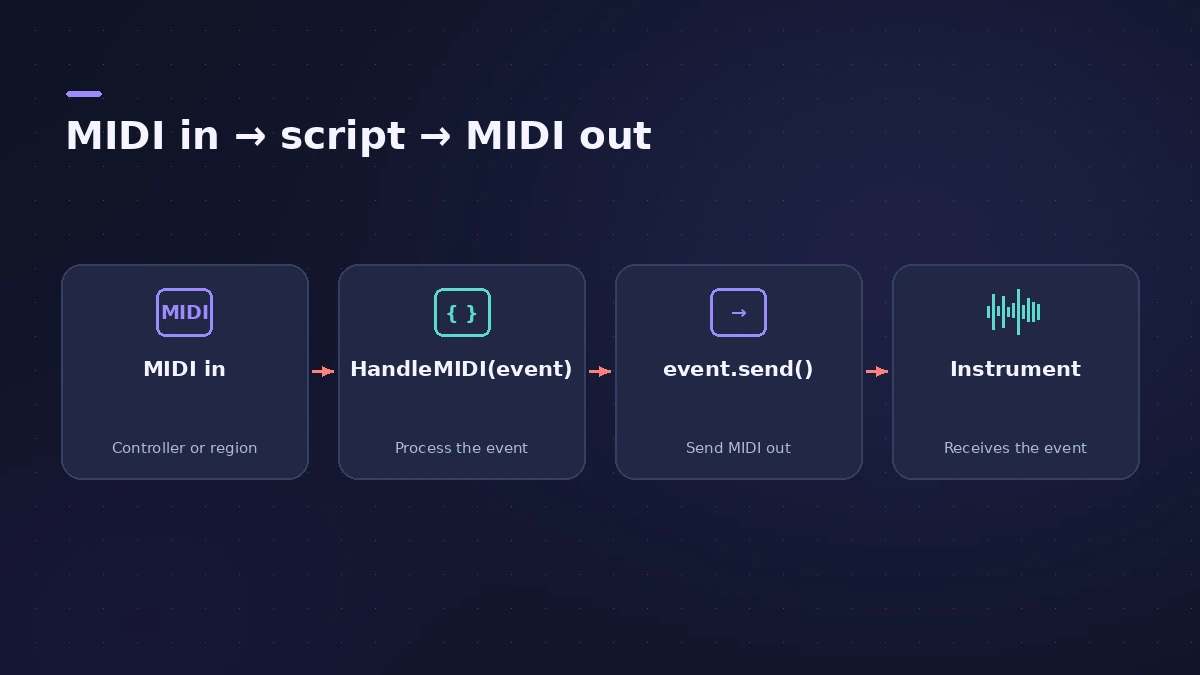
| Function | Purpose |
|---|---|
| HandleMIDI(event) | Called every time Scripter receives a MIDI event |
| event.send() | Sends the event on to the instrument |
| event.trace() | Prints the event to the plug-in console |
| PluginParameters | Defines the plug-in's own controls, read with GetParameter() |
| ProcessMIDI, SetParameter, ParameterChanged, Reset | Other functions in Apple's MIDI processing reference |
Step by step
-
1
Insert Scripter
Choose Scripter in the MIDI FX slot of a software instrument track.
-
2
Try a factory script
Pick a script from the settings menu — for example Guitar Strummer — and play.
-
3
Open the Script Editor
Click Open Script in Editor to see the JavaScript, with syntax highlighting for the MIDI API.
-
4
Learn from the Tutorial scripts
At the bottom of the settings menu, the Tutorial submenu has simple examples, such as Transpose and Delay, to copy from.
-
5
Edit and run
Change the code and click Run Script. Saving the project keeps the script in the plug-in.
Common mistakes
- Deleting the event.send() line and wondering why no MIDI comes through.
- Writing heavy loops in HandleMIDI — community guides report a bad script can crash Logic Pro.
No code needed?
Many jobs are covered by ready-made MIDI FX — Chord Trigger, Note Repeater and the Arpeggiator.
Sources
- Apple — Logic Pro Effects 10.2: Use Scripter (old)
- Apple — Logic Pro X 10.4.5 Help: Use the Script Editor (old)
- Apple — Logic Pro Effects 10.1: Scripter API overview (old)
- Apple — Logic Pro X 10.4.5 Help: MIDI processing functions overview (old)
- Apple — Logic Pro X 10.4.5 Help: HandleMIDI function (old)
- Apple — Logic Pro X 10.4.5 Help: Use the JavaScript Event object (old)
- Apple — Logic Pro User Guide: GetParameter function
- Sound On Sound — Logic: Writing MIDI Scripts (Jul 2021)
- Andrew Hunt — Logic Pro Scripter Guide (community)
- Sound On Sound — Plug-in And Play: Logic X MIDI plug-ins (Nov 2013)
Checked November 2026. Logic ProFiles is independent of Apple; menu names can differ slightly between Logic Pro versions.
Frequently asked questions
Do I need to know JavaScript to use Scripter?
+
No. Apple notes you don't need programming knowledge to use scripts, but you can view and change them in the Script Editor.
Where are the Scripter examples?
+
In the Scripter settings menu; the Tutorial submenu at the bottom has basic examples you can open and reuse.
Related
- MIDI FX in Logic ProWhat each MIDI plug-in in Logic Pro does — Arpeggiator, Chord Trigger, Modifier, Modulator, Note Repeater, Randomizer, Scripter, Transposer, Velocity Processor.
- Chord Trigger in Logic ProPlay chords from single keys with Logic Pro's Chord Trigger: choose Single or Multi mode, set the trigger range, use Learn to assign chords and transpose them.
- Note Repeater in Logic ProCreate MIDI echoes, rolls and stutters with Logic Pro's Note Repeater: sync Delay to tempo, set Repeats, ramp velocity and transpose each repeat.
- Arpeggiator in Logic ProTurn chords into arpeggios with Logic Pro's Arpeggiator MIDI plug-in: set note order, rate and octaves, use Latch, build a 16-step grid and record the output.
- Instruments in Logic ProGuides to Logic Pro's instruments: Session Players, Drummer, Synth Players, Chord ID, Drum Machine Designer, Sampler, Step Sequencer and Play Surface.