Instruments
Note Repeater in Logic Pro
Note Repeater works like a delay, but on MIDI notes instead of audio. Each note you play is repeated a set number of times; because the repeats are real notes, they can get louder or softer, change pitch and trigger the instrument fresh every time.
 Owen Hartley

Where to find it
MIDI FX slot > Note Repeater
Note Repeater controls
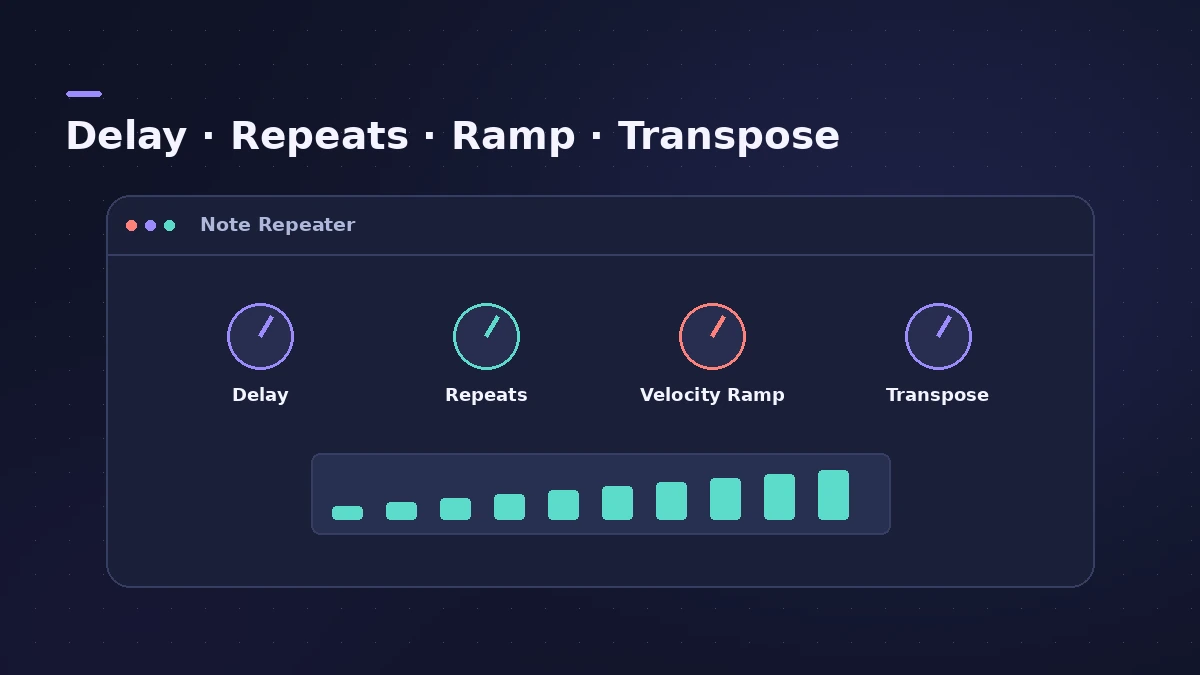
| Control | What it does |
|---|---|
| Delay / Delay Sync | Time between repeats, in ms or note values |
| Repeats | Number of repeats |
| Velocity Ramp | Repeats get louder or softer |
| Transpose | Shifts each repeat's pitch |
| Display | Original note (bright) and repeats, height = velocity |
| Note Range | Which notes are processed |
| Input Thru | Also pass the original note |
Step by step
-
1
Insert Note Repeater
Choose Note Repeater in the MIDI FX slot of a synth or drum track.
-
2
Sync the delay
Turn on Delay Sync and set the Delay to a note value such as 1/4 or 1/16; off, the delay is in milliseconds.
-
3
Set Repeats
Choose how many repeats each note produces.
-
4
Ramp the velocity
Use Velocity Ramp so repeats fade out — or build up for a crescendo.
-
5
Transpose or limit
Transpose each repeat for rising or falling patterns, and use the Note Range sliders to process only some keys.
Common mistakes
- Using many repeats on a polyphonic patch and running out of voices.
- Leaving Input Thru off when you want to hear the original note too.
More rhythm tools
For drum rolls on a grid, use note repeats in the Step Sequencer. For arpeggios, use the Arpeggiator.
Sources
- Apple — Logic Pro for iPad User Guide: Note Repeater
- Apple — Logic Pro Effects 10.2: Note Repeater (old)
- Apple — MainStage Effects 3.2: Note Repeater (Input Thru)
- Sound On Sound — Plug-in And Play: Note Repeater (Nov 2013)
Checked November 2026. Logic ProFiles is independent of Apple; menu names can differ slightly between Logic Pro versions.
Frequently asked questions
What's the difference between Note Repeater and a delay plug-in?
+
Note Repeater repeats MIDI notes, which then play the instrument again; an audio delay repeats the sound itself.
Can Note Repeater sync to tempo?
+
Yes. With Delay Sync on, the delay is set in bar and beat values.
Related
- MIDI FX in Logic ProWhat each MIDI plug-in in Logic Pro does — Arpeggiator, Chord Trigger, Modifier, Modulator, Note Repeater, Randomizer, Scripter, Transposer, Velocity Processor.
- Arpeggiator in Logic ProTurn chords into arpeggios with Logic Pro's Arpeggiator MIDI plug-in: set note order, rate and octaves, use Latch, build a 16-step grid and record the output.
- Step Sequencer in Logic ProProgram beats with Logic Pro's Step Sequencer: create a Pattern Region, set step rate and velocity, add note repeats and automation, follow the chords.
- Stereo Delay in Logic ProUse Stereo Delay in Logic Pro: set delay, feedback and mix for each side, sync to tempo with note values, use crossfeed for ping-pong and filter the repeats.
- Instruments in Logic ProGuides to Logic Pro's instruments: Session Players, Drummer, Synth Players, Chord ID, Drum Machine Designer, Sampler, Step Sequencer and Play Surface.