BPM to delay time calculator
Enter your project tempo to get delay times for every note value, straight, dotted and triplet. Use them in delays that don't sync to tempo, for reverb pre-delay, or to check what a synced delay is doing.
 Owen Hartley
The formula
Quarter note (ms) = 60,000 ÷ BPM. Halve it for an eighth, double it for a half note. A dotted note is 1.5 × the straight value; a triplet is ⅔ of it. The rate in Hz is 1,000 ÷ the time in ms.
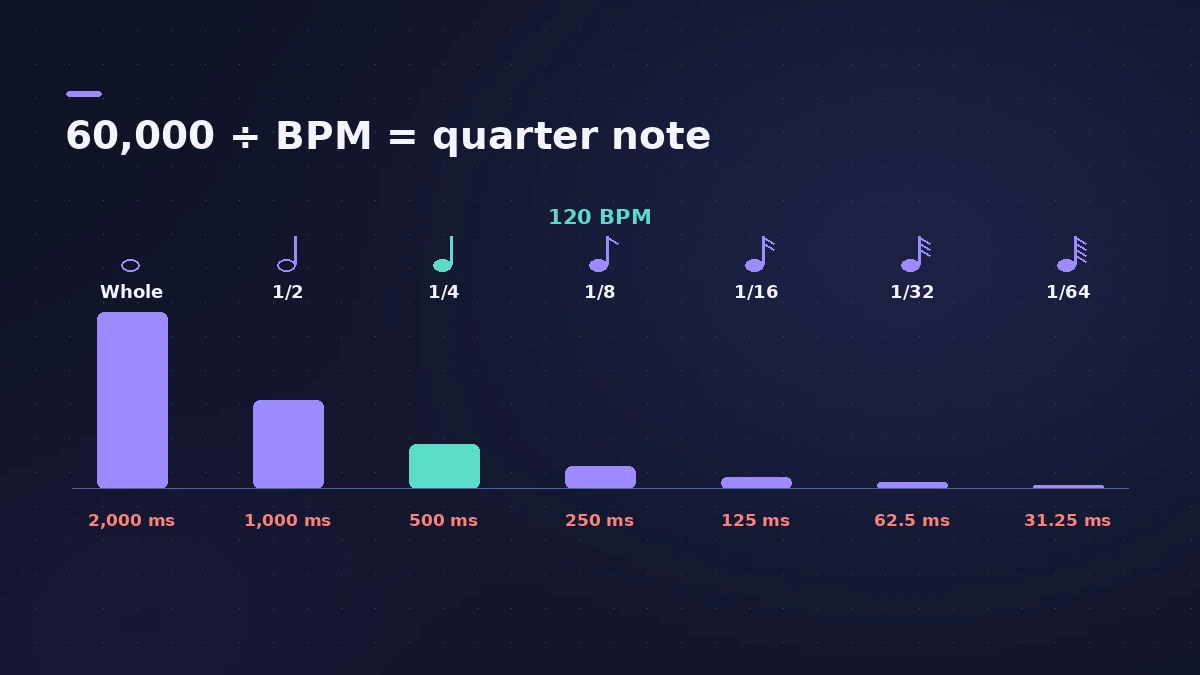
| Note at 120 BPM | Straight | Dotted | Triplet |
|---|---|---|---|
| 1/4 | 500 ms | 750 ms | 333.3 ms |
| 1/8 | 250 ms | 375 ms | 166.7 ms |
| 1/16 | 125 ms | 187.5 ms | 83.3 ms |
In Logic Pro
Stereo Delay and Delay Designer can sync to the project tempo, so you often won't need to type milliseconds. The table is handy for effects that only take a time in ms, and for setting reverb pre-delay to a musical value.
Sources
- Apple — Logic Pro User Guide for iPad: Stereo Delay
- Apple — Logic Pro User Guide for iPad: Delay Designer
- Apple — Logic Pro User Guide for Mac: Glossary
Checked November 2026. Logic ProFiles is independent of Apple; menu names can differ slightly between Logic Pro versions.
Frequently asked questions
How many milliseconds is a quarter note at 120 BPM?
+
500 ms. Divide 60,000 by the BPM.
How do I work out a dotted eighth?
+
Take the eighth-note time and multiply by 1.5 — at 120 BPM that's 375 ms.
Do I need this for Logic Pro's delays?
+
Stereo Delay can sync to the project tempo with note values, but the ms figures help with non-synced effects and pre-delay.
Related
- Stereo Delay in Logic ProUse Stereo Delay in Logic Pro: set delay, feedback and mix for each side, sync to tempo with note values, use crossfeed for ping-pong and filter the repeats.
- Delay Designer in Logic ProBuild rhythmic echoes with Delay Designer in Logic Pro: create up to 26 taps by tapping or adding them, set level, pan, pitch and filter per tap, and sync.
- Bars to time calculatorWork out how long a number of bars lasts at any tempo and time signature, how long one bar is, and how many bars fit a target length such as a 30-second ad.
- Audio calculatorsFree audio calculators for Logic Pro: buffer latency, file size, BPM to delay time, bars to time, tempo change, samples to ms and note frequency.