MainStage & Live
Using the MainStage Tuner
MainStage has a built-in Tuner for instruments played through an audio channel strip. Open it from the toolbar, play one note and watch the display — no separate tuner pedal needed.
 Owen Hartley

Where to find it
Toolbar > Tuner (Command-T)
Tuner checklist
| Check | Why |
|---|---|
| Tuning fork icon | The strip can feed the Tuner |
| First audio strip active | It is the one tuned |
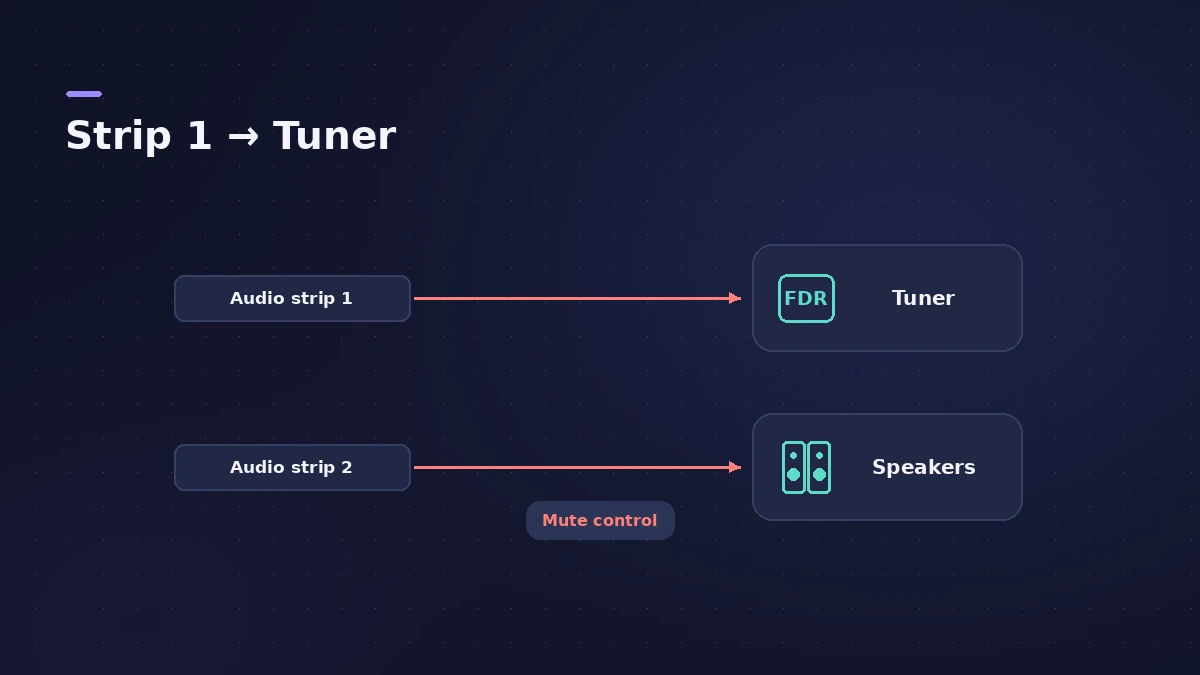
| Other amps muted | They stay audible |
| Single notes | Chords can't be tuned |
Step by step
-
1
Check the channel strip
Channel strips that can use the Tuner show a tuning fork icon.
-
2
Open the Tuner
Click the Tuner icon in the toolbar or press Command-T.
-
3
Play one note
The Tuner shows the nearest note; red bars show if you are sharp or flat.
-
4
Silence other strips
Only the first audio channel strip feeds the Tuner, but other strips stay audible — mute a second amp.
-
5
Map it to a switch
The Tuner action can show or hide the Tuner from a button screen control.
Common mistakes
- Playing chords — the Tuner needs a single note.
- Muting the first audio channel strip, which is the one that feeds the Tuner.
Tuner plug-in
You can also insert the Tuner plug-in on an audio channel strip. For a whole guitar rig, see guitar rig.
Sources
- Apple — MainStage User Guide: Tune instruments with the Tuner
- Apple — MainStage User Guide: Tuner utility and plug-in
- Apple — MainStage 3 manual: Tune with the Tuner (multiple channel strips)
- Apple — MainStage 3.5 Guide: Table of actions
Checked November 2026. Logic ProFiles is independent of Apple; menu names can differ slightly between Logic Pro versions.
Frequently asked questions
What is the shortcut for the MainStage Tuner?
+
Command-T opens the Tuner in the workspace.
Why does my second amp still sound while tuning?
+
Only the first audio channel strip goes to the Tuner; mute the others, for example with the expression pedal.
Related
- Using MainStage as a guitar rigUse MainStage as a live guitar rig: connect your guitar, start from a guitar template with Amp Designer and Pedalboard, bypass pedals by foot, and tune.
- Tuner in Logic ProTune a guitar, bass or any instrument in Logic Pro with the control-bar Tuner or the Tuner plug-in: read cents, change the A=440 reference, mute while tuning.
- MainStage gig checklistApple's checks before playing live with MainStage: test audio and MIDI, close other apps, go offline, use the same hardware, then switch to Perform mode.
- MainStage and live performancePlay Logic Pro's instruments on stage with MainStage 4: concerts and patches, backing tracks, MIDI controllers, Ableton Link and pre-gig checks.