MainStage & Live
Keyboard splits and layers in MainStage
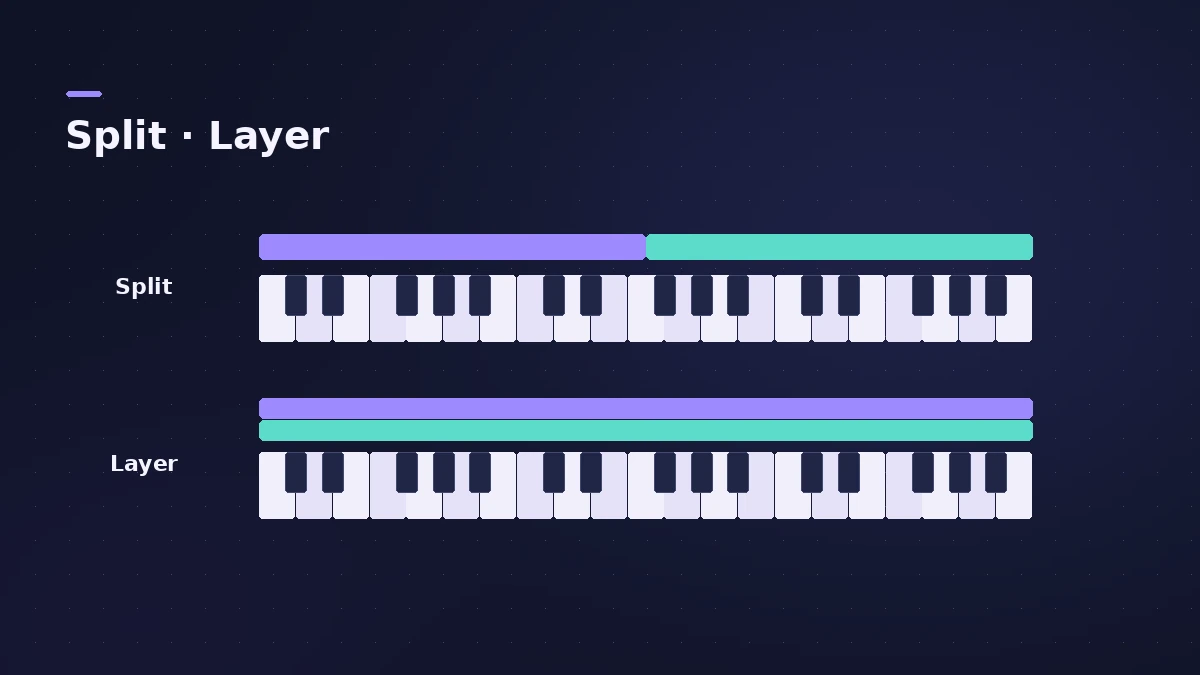
A layer stacks two sounds on the same keys; a split puts them on different parts of the keyboard. In MainStage you do both the same way: add channel strips to a patch and set each one's key range in the Layer Editor.
 Owen Hartley

Where to find it
Channel Strip Inspector > Layer Editor
Split or layer
| Goal | Key ranges |
|---|---|
| Bass left, piano right | Bass C0–B2, piano C3–C7 |
| Strings under piano | Both on the full range |
| Pad only on top notes | Pad's Low Key high up |
Step by step
-
1
Add channel strips
Add two or more channel strips to a patch — for example bass and piano.
-
2
Open the Layer Editor
Select a channel strip and click the Layer Editor tab in the Channel Strip Inspector.
-
3
Set the key range
Drag the edges of the layer, type Low Key and High Key values, or click Learn and press the lowest and highest keys.
-
4
Layer instead of split
Give two channel strips the same key range to hear both sounds together.
-
5
Use a floating split
Set a floating split point so the split moves a few semitones as you play across it.
Common mistakes
- Overlapping key ranges by accident, so both sounds play on a few keys.
- Forgetting that a set- or concert-level channel strip takes precedence inside its key range.
Splits across a whole set
Add a channel strip at the set level for a split shared by every patch in the set; individual patches can override it. Assign controls in MIDI controller.
Sources
- Apple — MainStage User Guide: Overview of layers and splits
- Apple — MainStage User Guide: Define the key range
- Apple — MainStage User Guide: Set floating split points
- Apple — MainStage User Guide: Override concert- and set-level key ranges
- Apple — MainStage User Guide: Channel Strip Inspector
Checked November 2026. Logic ProFiles is independent of Apple; menu names can differ slightly between Logic Pro versions.
Frequently asked questions
How do I split a keyboard in MainStage?
+
Add channel strips to a patch and give each a different Low Key and High Key in the Layer Editor.
What is a floating split point?
+
A split that moves by up to the set number of semitones depending on the notes you play as you approach it.
Related
- How to set up a MainStage concertSet up a MainStage concert: connect your gear, choose a template, add patches and sets, assign your controller, then switch to Perform mode before the gig.
- Assign a MIDI controller in MainStageAssign your MIDI controller's knobs, faders and buttons in MainStage with Learn: select a control, click Assign & Map, move it — press buttons three times.
- Changing patches live in MainStageSwitch patches in MainStage while you play: arrow keys, Next Patch and Prev Patch actions on a foot switch, program changes and Silence Previous Patch.
- MainStage and live performancePlay Logic Pro's instruments on stage with MainStage 4: concerts and patches, backing tracks, MIDI controllers, Ableton Link and pre-gig checks.