Recording
How to record audio from other apps into Logic Pro
Logic Pro records from audio inputs, so to capture sound playing in another app you need a virtual audio device that loops that app's output back in. The free BlackHole driver and Rogue Amoeba's paid Loopback both do this. For MIDI from another music app, Logic Pro has its own virtual port, Logic Pro Virtual In.
 Owen Hartley
Where to find it
Audio MIDI Setup + Logic Pro > Settings > Audio
Which tool
| Tool | Cost | Notes |
|---|---|---|
| BlackHole | Free, open source | Virtual device; pair with an aggregate device |
| Loopback | Paid | Builds virtual devices from apps and hardware |
| Logic Pro Virtual In | Built in | MIDI only, from other music apps |
Step by step
-
1
Install a loopback driver
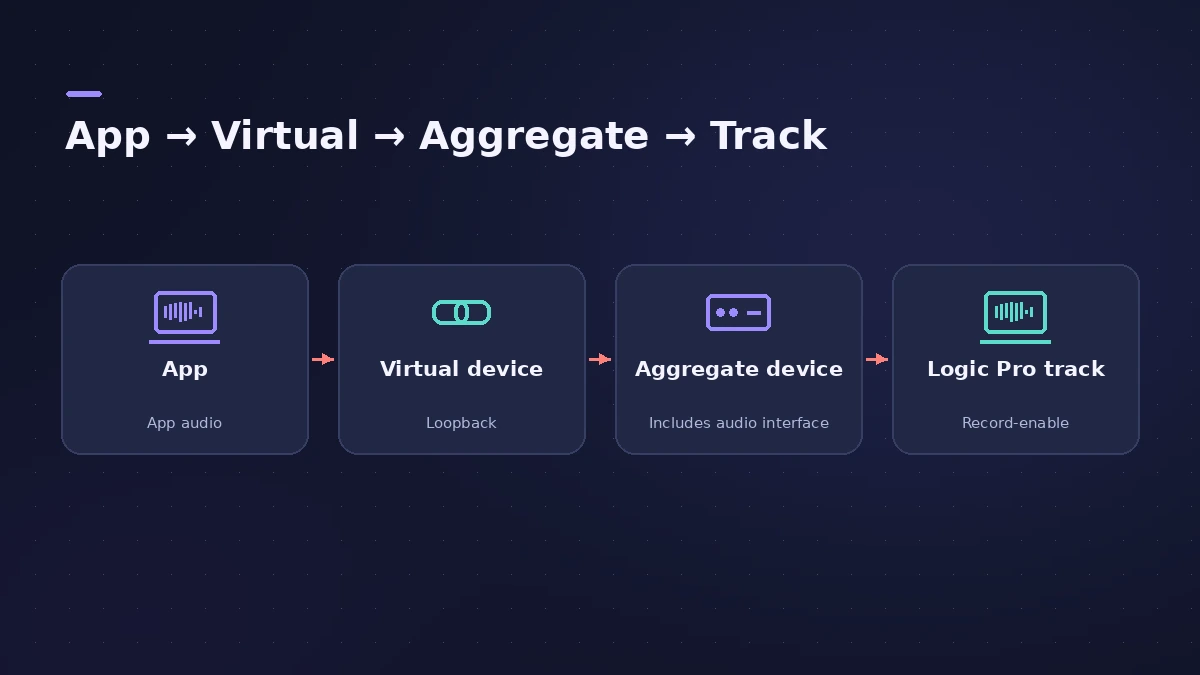
Install BlackHole (free, open source) or Loopback. Either adds a virtual audio device to the Mac.
-
2
Send the other app to it
Set the other app's output — or the Mac's sound output — to the virtual device.
-
3
Combine with your interface
In Audio MIDI Setup create an Aggregate Device with your interface and the virtual device, so you can record the loopback and still hear Logic Pro.
-
4
Choose it in Logic Pro
In Logic Pro > Settings > Audio > Devices, choose the aggregate device. Set an audio track's input to the virtual device's channels.
-
5
Arm and record
Arm the track, start playback in the other app and press R.
Common mistakes
- Monitoring the loopback track while it also feeds back into itself — keep input monitoring off on that track.
- Recording copyrighted material you don't have rights to.
- Forgetting to switch the Mac's sound output back afterwards.
Recording MIDI from another app
In Logic Pro > Settings > MIDI > Inputs, enable Logic Pro Virtual In, then set the other app's MIDI output to it and record on a software instrument or external MIDI track. For normal MIDI recording see record MIDI.
Sources
- Existential Audio — BlackHole audio loopback driver (GitHub)
- Rogue Amoeba — Loopback
- Apple Support — Create an Aggregate Device to combine multiple audio devices
- Apple — Logic Pro User Guide: Record MIDI messages from another music app
Checked November 2026. Logic ProFiles is independent of Apple; menu names can differ slightly between Logic Pro versions.
Frequently asked questions
Can Logic Pro record system audio without extra software?
+
Not directly: it records from audio inputs. A loopback driver turns another app's output into an input Logic Pro can record.
Is BlackHole free?
+
Yes. It's an open-source macOS loopback driver published on GitHub.
Why use Loopback instead?
+
Rogue Amoeba's Loopback is a paid app that builds virtual devices from apps and hardware without manual aggregate setup.
Related
- How to record multiple tracks at once in Logic ProRecord a band, drum kit or podcast in Logic Pro: one input and track per mic, arm them all, record in one pass, and add inputs with an aggregate device.
- How to record MIDI with a keyboard in Logic ProRecord MIDI from a keyboard in Logic Pro: arm an instrument track, record with a count-in, overdub, replace or take passes in Cycle mode, then quantize.
- How to set up an audio interface in Logic ProConnect a USB or Thunderbolt audio interface to Logic Pro: choose input and output devices, set the I/O buffer, allow mic access and pick track inputs.
- Recording in Logic ProHow to record in Logic Pro: vocals, electric and acoustic guitar, bass, drums and MIDI, plus cycle takes, punch-in, Flashback Capture and step input.