Logic Pro for Windows: the honest answer and your real options
Quick answer
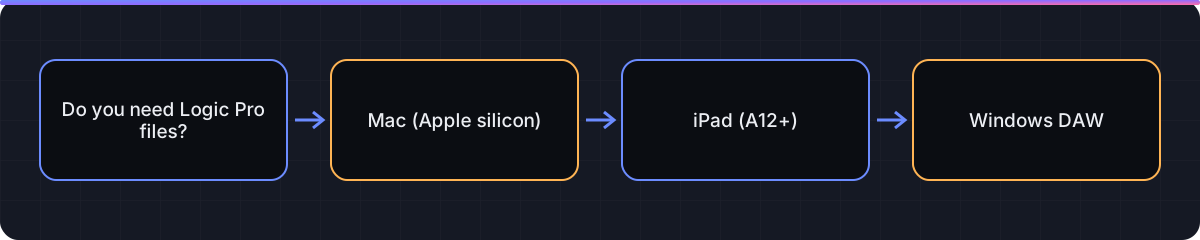
Logic Pro is a macOS and iPadOS app only; Apple's requirements page lists Macs with Apple silicon and iPads with an A12 Bionic or later, and there is no Windows build. If you want Logic Pro itself, your choices are a Mac or Logic Pro for iPad through Apple Creator Studio. If you want to stay on Windows, Ableton Live, FL Studio, Cubase, REAPER, Studio One and Cakewalk all run natively, and you can exchange work with Logic users by swapping audio stems and MIDI files.
Platform and version
Choose a route in five decisions
We do not cover running macOS on non-Apple hardware, virtual machines or unofficial copies. None of those are supported by Apple, they break Apple's licence terms, and audio drivers in a VM are not usable for real-time recording. The options below are the ones that work.
- Decide whether you need Logic Pro specifically. If a collaborator, course or job requires Logic Pro project files, only a Mac or iPad will do. If you just want a capable DAW, a Windows DAW is cheaper than changing computers.
- Price the Mac route honestly. A Mac mini is the lowest-cost Apple silicon desktop and runs Logic Pro 12 on macOS 15.6 or later; a MacBook Air adds portability. Add US$199.99 for Logic Pro for Mac or US$12.99 a month for Creator Studio. Check the requirements before buying a used Mac so you avoid Intel models.
- Consider Logic Pro for iPad. An iPad with an A12 Bionic or later on iPadOS 26 runs Logic Pro for iPad as part of Creator Studio. It is a full DAW with a touch-first layout, and its projects open on the Mac version. See the iPad guide for what it lacks compared with Mac.
- Shortlist Windows DAWs by workflow. Loop- and clip-based electronic production suits Ableton Live or FL Studio; linear recording and scoring suits Cubase or Studio One; tight budgets suit REAPER's long evaluation and Cakewalk's free tier. The table below links the vendor pages.
- Agree an exchange format with collaborators. No DAW opens another's native project. Swap consolidated audio stems, MIDI files and a tempo note, and the project moves cleanly in either direction. Logic users can follow our stem export guide.
Options compared
Prices change often and vary by region, so we link each vendor's page rather than quoting figures we have not confirmed today.
| Option | Runs Logic Pro? | Platform | Editions or tiers (vendor-stated) | Where to check price |
|---|---|---|---|---|
| Mac mini or MacBook with Apple silicon | Yes, Logic Pro 12 | macOS 15.6 or later | Logic Pro US$199.99 once, or Creator Studio US$12.99/month | apple.com/logic-pro |
| iPad with A12 Bionic or later | Yes, Logic Pro for iPad | iPadOS 26 or later | Included in Creator Studio for new customers | apple.com/logic-pro/trial |
| Ableton Live 12 | No | Windows and macOS | Intro, Standard, Suite | ableton.com compare editions; check vendor page |
| FL Studio | No | Windows and macOS | Fruity, Producer, Signature Bundle, All Plugins; vendor promises lifetime free updates | image-line.com compare editions; check vendor page |
| Cubase 14 | No | Windows and macOS | Elements, Artist, Pro (names from Steinberg's range; confirm on the vendor site) | steinberg.net/cubase; check vendor page |
| REAPER | No | Windows, macOS, Linux | Single product; fully functional 60-day evaluation with no registration | reaper.fm download; check vendor page |
| Studio One Pro 7 | No | Windows 10 20H1 or 11, macOS 10.14 or later, Linux beta | Pro; earlier Artist and Prime editions listed in PreSonus specs | presonus.com tech specs; check vendor page |
| Cakewalk Sonar / Cakewalk Next | No | Windows 10 or later (Sonar); Next also on macOS 10.15 or later | Activation tied to BandLab Membership; see site for free versus paid | cakewalk.com; check vendor page |
Moving a project between Logic Pro and a Windows DAW
Work from stems, not project files. In Logic Pro, choose File > Export > All Tracks as Audio Files, tick Include Audio Tail, keep the same sample rate as the session, and start every file at bar 1 so they line up when dropped into a new project. Export MIDI with File > Export > Selection as MIDI File. Write the tempo and key in a text note alongside. In the other direction, ask your Windows collaborator for the same: one audio file per track from the project start, plus any MIDI, and import them into Logic with File > Import > Audio File on a blank project set to the same tempo.
Why there is no workaround we recommend
macOS is licensed by Apple for Apple hardware, so installing it on a PC is not something we will walk you through. Virtual machines cannot deliver the low-latency audio drivers a DAW needs. Unofficial copies of Logic Pro are both illegal and unsafe. Pick one of the supported routes above.

Next steps
- Leaning toward a Mac? Confirm the requirements and try the 30-day trial before committing.
- Comparing DAWs feature by feature? Read Logic Pro vs Ableton Live and Logic Pro vs FL Studio.
- Need to hand a Logic session to a PC user today? Follow export stems from Logic Pro.
FAQ
Will Apple ever release Logic Pro for Windows?
Apple has never announced one, and its current requirements page lists only Mac and iPad. Plan around what exists today.
Can I run Logic Pro in a virtual machine on my PC?
We do not recommend or explain it. Apple does not support macOS on non-Apple hardware, and VM audio is unsuitable for real-time recording.
What is the cheapest way to get Logic Pro?
A Mac mini with Apple silicon plus the US$199.99 one-time purchase, or an eligible iPad with Creator Studio at US$12.99 a month.
Which Windows DAW is most like Logic Pro?
Cubase and Studio One share Logic's linear, track-based layout; Ableton Live and FL Studio lean toward clip and pattern workflows.
Can a Windows DAW open a Logic Pro project file?
No. Exchange consolidated audio stems and MIDI files instead; both directions work reliably.
Is there a free Windows DAW?
Cakewalk offers products under a BandLab Membership model and REAPER has a fully functional 60-day evaluation; check each vendor page for current terms.
Does GarageBand run on Windows?
No. GarageBand is also Mac, iPad and iPhone only.
Related guides
Part of Download & requirements — see every guide in this hub.
 Guide
Logic Pro for iPad: how to get it, what it needs, and how it differs from Mac
Availability through Creator Studio, iPad requirements, Mac differences, and moving projects between the two.
5 min read Guide
Logic Pro system requirements: what your Mac or iPad needs
Minimum and recommended Mac and iPad specs, Intel Mac status, and how much space the Sound Library really takes.
6 min read Compare
Logic Pro vs Ableton Live 12
Logic Pro wins on price and bundled content; Ableton Live wins on Session View, live performance and Windows support. Here is how to choose.
6 min read
Sources checked
- Apple Support: Apple Creator Studio system requirements
- Apple: Logic Pro
- Apple: Try Logic Pro with Apple Creator Studio
- Ableton: Compare Live editions
- Image-Line: Compare FL Studio editions
- Steinberg: Cubase
- REAPER: Download and evaluate
- PreSonus: Studio One Pro tech specs
- Cakewalk by BandLab
Last checked 3 November 2026 by the Logic Pro Files Team.