Fix Problems
No sound in Logic Pro — 10 fixes, quickest first
When Logic Pro plays but you hear nothing, the cause is usually one setting: the wrong output device, a muted or soloed track, or Core Audio switched off. Work down the list from the top — the first fixes take seconds. If they don't help, testing with the Mac's built-in audio tells you whether your interface is to blame.
 Owen Hartley
Applies to: Logic Pro 13, 12 and 11 for Mac.
Most likely causes
- Output Device set to the wrong interface or speakers (most common)
- Track muted, turned off or silenced by a solo (most common)
- Core Audio disabled at launch (common)
- Audio interface driver or compatibility problem (common)
- Instrument plug-in not loaded or a third-party plug-in failing (occasional)
No sound from what?
| What's silent | Most likely cause | Go to |
|---|---|---|
| The whole project | Output Device or Core Audio | Fixes 1, 2 and 5 above |
| One track | Mute, solo, On/Off or plug-in | Fixes 3, 4, 6 and 7 |
| Your mic or guitar while playing | Input monitoring | Input monitoring not working |
| A software instrument you play | MIDI input | MIDI keyboard not working |
| Only the click | Metronome settings | Fix 8 |
Opened Logic Pro with audio off?
Holding Control while Logic Pro opens shows a dialog. Clicking Don't Launch opens it with Core Audio disabled — useful for troubleshooting, but nothing will play until you quit and reopen it normally. The full list of startup keys is in our crashing guide.
Fixes, in order
1. Check the Output Device
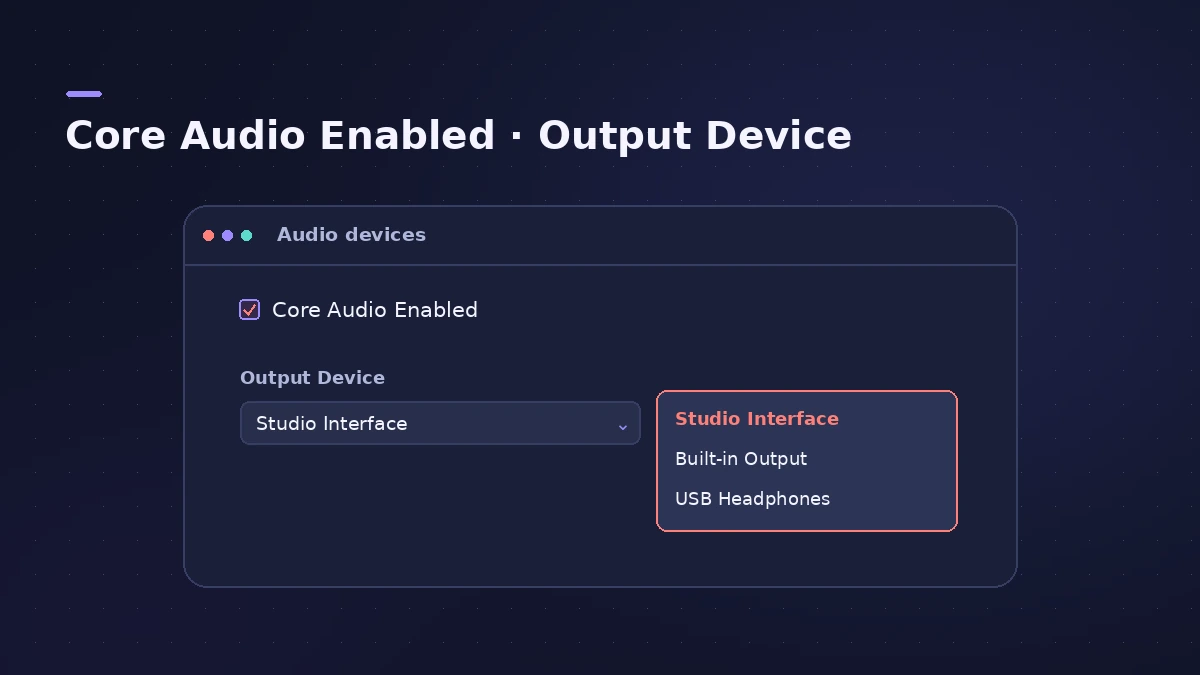
Logic Pro > Settings > Audio > Devices. Make sure Output Device is the interface, headphones or speakers you're actually listening on.
2. Make sure Core Audio is enabled
In the same pane, Core Audio Enabled must be selected. When it's off you hear no audio and audio plug-ins are disabled, though MIDI still plays.
3. Look for mutes and solos
Muted tracks show gray regions with colored names. A soloed track silences every other track. Press M to toggle mute on the selected track.
4. Check the track's On/Off button
A track switched off with its On/Off button shows gray regions and gray names. Turn it back on in the track header.
5. Test the Mac's built-in audio
Unplug the interface and set Output Device to Built-In Output. If Logic Pro plays now, your interface may need a driver update or service.
6. Wake up a silent instrument track
Apple documents a case where an instrument isn't activated by dynamic plug-in loading. Draw an empty region on the track with the Pencil tool, or clear "Only load plug-ins needed for project playback" in File > Project Settings > General.
7. Bypass third-party plug-ins
If you're not using an interface, Apple suggests bypassing third-party Audio Units plug-ins to see if one is muting the output.
8. Turn the metronome on
No click? Press K or click the Metronome button in the control bar. Control-click it to choose when the click plays.
9. Restart and update
Restart your Mac and update Logic Pro from the App Store, as Apple's troubleshooting article recommends.
10. Swap Bluetooth for wired headphones
Apple says Bluetooth headphones and speakers add latency and are for listening, not recording. Wired headphones rule out a Bluetooth glitch.
Sources
- Apple — If Logic Pro for Mac isn't working (Feb 2026)
- Apple — Logic Pro User Guide: Devices settings in Logic Pro for Mac
- Apple — Logic Pro User Guide: Mute tracks in Logic Pro for Mac
- Apple — Logic Pro User Guide: Use the metronome in Logic Pro for Mac
- Apple — If you can't hear sound on tracks with Native Instruments Maschine in Logic Pro for Mac 10.4.5 or later (Mar 2025)
- Apple — Use startup modifier keys with Logic Pro for Mac (Aug 2023)
- Apple — Manage input monitoring latency in Logic Pro for Mac (May 2026)
Checked November 2026. Logic ProFiles is independent of Apple; menu names can differ slightly between Logic Pro versions.
Frequently asked questions
Why is Logic Pro playing but there's no sound?
+
The most common reason is that Output Device in Settings > Audio > Devices points at a different interface or speaker than the one you're listening to. A muted track or an active solo is the next thing to check.
Why can I see MIDI notes play but hear nothing?
+
If Core Audio is disabled, MIDI still records and plays back but no audio comes out. Reopen Logic Pro normally or select Core Audio Enabled.
Why can't I hear my microphone in Logic Pro?
+
That is an input monitoring problem rather than a playback one. See our input monitoring guide.
Related
- Regions greyed out and not playingRegions greyed out and silent in Logic Pro? Read the grey: a coloured name means track mute or solo, a dot means region mute, all grey means the track is off.
- MIDI region not playing in Logic ProRecorded MIDI plays nothing in Logic Pro? Check the region isn't muted, the track is on, nothing is soloed, and start playback before the note, not mid-note.
- Input monitoring not working in Logic Pro — 8 fixesCan't hear yourself in Logic Pro? Check Software Monitoring, the track's Input Monitoring button, the focused-track setting and direct monitoring.
- Logic Pro keeps crashing or won't open — 14 fixesLogic Pro crashing, quitting or stuck on launch? Follow Apple's order: restart, update, isolate plug-ins with startup keys, reset settings, reinstall.
- MIDI keyboard not working in Logic Pro — 9 fixesLogic Pro not responding to your MIDI keyboard? Check USB and drivers, rescan in Audio MIDI Setup, reset all MIDI drivers and arm a software instrument track.
- Fix Logic Pro problems — errors, crashes and no soundStep-by-step fixes for Logic Pro on Mac: system overload, disk too slow, no sound, crashes, latency, missing plug-ins, MIDI keyboards and recording problems.