Logic Pro plug-ins not showing up: validate, rescan, or run Rosetta
Quick answer
Open Logic Pro > Settings > Plug-in Manager and find the plug-in by manufacturer. If the Compatibility column reads failed validation, select it and click Reset & Rescan Selection; if it is not listed at all, click Full Audio Unit Reset and relaunch. Logic Pro loads Audio Units only, so a VST or AAX install will never appear, and a plug-in built only for Intel Macs needs Logic to run under Rosetta, which Apple says also disables Stem Splitter and ChromaGlow.
Platform and version
Match the symptom to the first thing to check
| Symptom | Exact text you see | First check | Go to |
|---|---|---|---|
| Plug-in installed, not in the Audio FX or Instrument slot menu | (no message) | Plug-in Manager Compatibility column | Rescan |
| Plug-in in the Plug-in Manager with a red status | failed validation | Reset & Rescan Selection; manufacturer's macOS and Apple silicon support | Rescan |
| Plug-in in the Plug-in Manager, greyed | not authorized | Run the manufacturer's license app, then rescan | Rescan |
| Plug-in not in the Plug-in Manager at all | (no row) | Was it installed as a VST or AAX only? Is the .component file in the Components folder? | AU vs VST |
| Plug-in appears only when Logic runs with Rosetta | (no message) | Intel-only build; check for a native update | Rosetta |
| Plug-ins vanished after a macOS update | failed validation on many rows | Full Audio Unit Reset; vendor updates | Full reset |
| Apple's own plug-ins seem missing from menus | (no message) | Enable Complete Features in Logic Pro > Settings > Advanced | Complete Features |
Diagnosis order
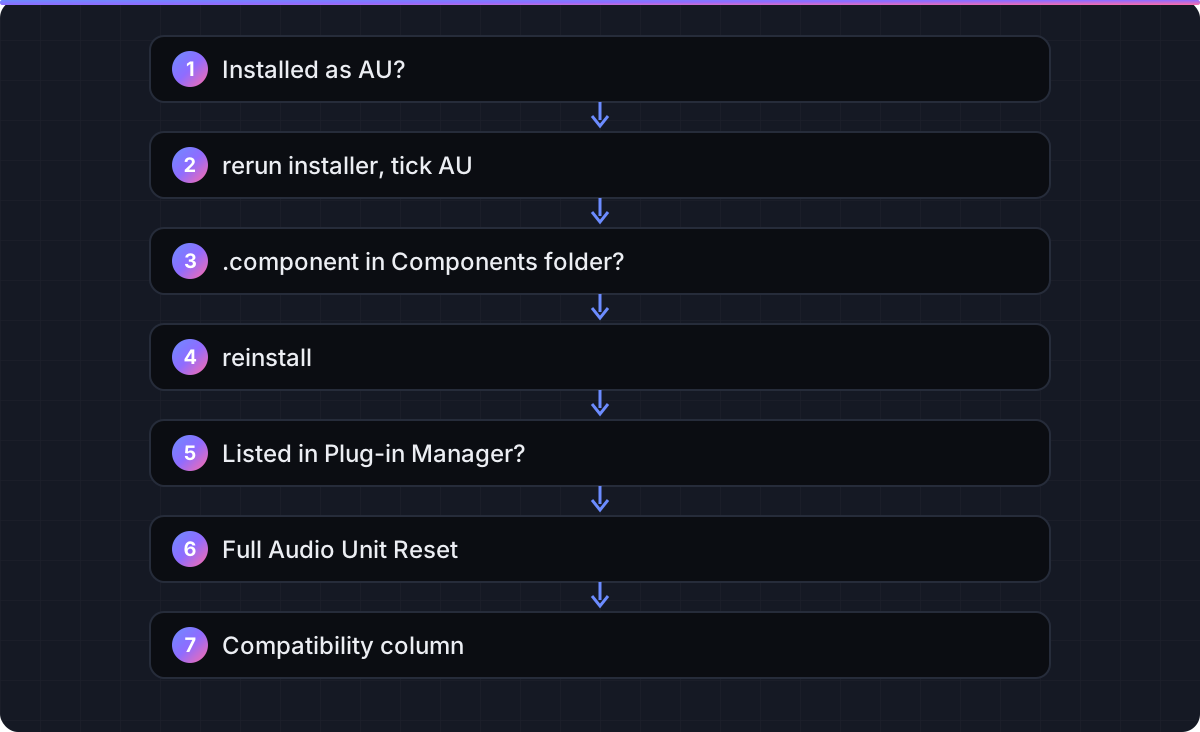
- Restart the Mac and reopen Logic. Apple's article lists this first, and it triggers a rescan of anything new.
- Look in the slot menu properly. Click an Audio FX, Instrument or MIDI FX slot and open the manufacturer sub-menus; third-party plug-ins are grouped by vendor, not listed alphabetically at the top.
- Confirm the format. Logic loads Audio Units only. Check the installer's options for an AU or Components checkbox, and confirm a
.componentfile exists in/Library/Audio/Plug-Ins/Componentsor~/Library/Audio/Plug-Ins/Components. - Confirm the architecture. Logic Pro 12 runs only on Apple silicon, so a plug-in must offer a native build or Logic must run under Rosetta.
- Open the Plug-in Manager and read the Compatibility column.
- Then rescan, reset, or switch Rosetta as below.
Fixes
Rescan one plug-in in the Plug-in Manager
Choose Logic Pro > Settings > Plug-in Manager (Preferences on macOS 12 or earlier). Click the manufacturer's name in the left column to filter the list. Find the plug-in and read the Compatibility column. If it reads failed validation, select the row and click Reset & Rescan Selection. If it reads not authorized, run the manufacturer's license or activation app first, then rescan. According to Apple, a plug-in that fails validation twice should be checked with the manufacturer for a version that supports your macOS. If it validates but you still do not see it in projects, make sure its Use checkbox is ticked. Expected result: the status changes to successfully validated and the plug-in appears in slot menus.
Full Audio Unit Reset
If the plug-in is not listed at all, click Full Audio Unit Reset in the Plug-in Manager, then quit and reopen Logic so it rescans every Audio Unit. Apple notes this also resets the list for MainStage. As a last resort Apple describes clearing the cache: in the Finder hold Option and choose Go > Library, open Caches, move the contents of AudioUnitCache to the Desktop, restart the Mac and reopen Logic; the rescan can take a long time. Expected result: the plug-in is listed and validates.
AU vs VST: Logic loads Audio Units only
Logic Pro supports the Audio Units format and nothing else. Many installers offer VST, VST3, AAX and AU as separate checkboxes; if AU was not ticked, nothing was installed for Logic even though the plug-in works in another DAW on the same Mac. Rerun the installer and select the Audio Unit or Components option. Apple also states that 32-bit plug-ins are not compatible with Logic Pro. VST wrappers exist but are outside Apple's support, and this site does not recommend them. Expected result: a .component file appears in the Components folder.
Check the Components folder
In the Finder choose Go > Go to Folder and enter /Library/Audio/Plug-Ins/Components. This is where installers put Audio Units for all users; ~/Library/Audio/Plug-Ins/Components in your home Library is the per-user location that some installers and most hand-copied plug-ins use. If the .component bundle is missing from both, reinstall. If it is present but Logic does not list it, run Full Audio Unit Reset. If a damaged plug-in prevents Logic from opening, hold Command and drag the suspect file out of the folder to the Desktop, restart, and relaunch, as Apple's disable-plug-ins article describes. Expected result: the folder contains the plug-in and Logic lists it.
Apple silicon vs Rosetta
Logic Pro 12 requires a Mac with Apple silicon. A plug-in compiled only for Intel loads only when the host runs under Rosetta. To turn that on: quit Logic Pro, Control-click Logic Pro in the Applications folder, choose Get Info, select Open using Rosetta, and reopen Logic. Apple's article on turning off Rosetta documents the same checkbox and says the only reason to use it is a third-party plug-in that works in ARA mode, such as Melodyne, and that most plug-ins do not need it. It also warns that Stem Splitter, ChromaGlow and most Mastering Assistant presets are unavailable under Rosetta. Apple's separate compatibility article adds that Intel-built Audio Units require Rosetta to be installed at all, and lists the ARA plug-ins affected. The better fix is a native update from the manufacturer; use Rosetta only while you wait for one, then deselect the checkbox. Expected result: the Intel-only plug-in appears, at the cost of the Apple silicon-only features.
Failed validation that will not clear
Validation runs the plug-in in a separate process and checks that it responds correctly; a crash or timeout fails it. You can still force Logic to load a plug-in that failed by ticking its Use checkbox in the Plug-in Manager, but that is how you get the crashes described on the crashing page. Prefer an update from the manufacturer. If you only need a stable session now, launch Logic holding Shift-Control, which Apple documents as opening with only validated plug-ins enabled.
Enable Complete Features
If Apple's own plug-ins, the Plug-in Manager itself, or the full Mixer seem to be missing, Logic is in its simplified mode. Choose Logic Pro > Settings > Advanced and select Enable Complete Features. Apple's overload article uses the same switch to expose the CPU meters. Expected result: the Plug-in Manager appears in the Settings menu and all stock plug-ins are listed.
Verify the fix
- Open
Logic Pro > Settings > Plug-in Manager, filter by manufacturer, and confirm the plug-in reads successfully validated with its Use checkbox ticked. - Create a new track, click the Audio FX or Instrument slot, open the manufacturer sub-menu and insert the plug-in.
- Open its window, change a parameter, play some audio or MIDI through it, then save and reopen the project to confirm it recalls.
- If you enabled Rosetta, confirm in Logic's About window or the Plug-in Manager that the plug-in loads, then plan to turn Rosetta off once a native build is available.
FAQ
Why doesn't my VST plug-in show up in Logic Pro?
Logic Pro loads only the Audio Units format. Rerun the installer and select the AU or Components option so a .component file is installed.
Where is the Plug-in Manager in Logic Pro?
Logic Pro > Settings > Plug-in Manager (Preferences on macOS 12 or earlier). If it is missing, turn on Enable Complete Features in Logic Pro > Settings > Advanced.
What does failed validation mean?
Logic's Audio Unit scan found that the plug-in did not respond correctly. Select it and click Reset & Rescan Selection; if it fails again, Apple's advice is to check with the manufacturer for an update.
Where do Audio Units live on a Mac?
In /Library/Audio/Plug-Ins/Components for all users, or ~/Library/Audio/Plug-Ins/Components in your home Library.
How do I run Logic Pro with Rosetta for an Intel plug-in?
Quit Logic, Control-click it in Applications, choose Get Info and select Open using Rosetta. Apple says this disables Stem Splitter, ChromaGlow and most Mastering Assistant presets, so turn it off once a native version exists.
Do I need Rosetta for Melodyne?
According to Apple, plug-ins used in ARA mode such as Melodyne are the main reason to run Logic under Rosetta. Check the manufacturer for a native ARA version first.
Why did all my plug-ins disappear after updating macOS?
The update triggered a fresh validation scan and some plug-ins failed on the new system. Run Full Audio Unit Reset in the Plug-in Manager and install vendor updates.
Can I install third-party plug-ins in Logic Pro for iPad?
Only Audio Unit Extensions from the App Store. There is no Components folder, Plug-in Manager or Rosetta on iPad.
Related guides
Part of Fix a problem — see every guide in this hub.
 Fix
Logic Pro keeps crashing or won't open: the fix order that works
A diagnosis order for crashes and launch failures: startup keys, Plug-in Manager, the preferences file, Sound Library, reinstall, and project rescue.
10 min read Fix
Logic Pro system overload: how to fix the error (-10011)
What the System Overload alert means and Apple's documented order of fixes, from buffer size to freezing tracks.
10 min read Guide
Logic Pro system requirements: what your Mac or iPad needs
Minimum and recommended Mac and iPad specs, Intel Mac status, and how much space the Sound Library really takes.
6 min read
Sources checked
- If you can't find a recently installed plug-in for Logic Pro for Mac or MainStage (Apple Support)
- Remove or disable Audio Units plug-ins in Logic Pro for Mac or MainStage (Apple Support)
- Turn off Rosetta for Logic Pro for Mac (Apple Support)
- About third-party Audio Units and external device compatibility in Logic Pro and Final Cut Pro on Mac computers with Apple silicon (Apple Support)
- Use startup modifier keys with Logic Pro for Mac (Apple Support)
- Logic Pro tech specs (Apple Support)
Last checked 3 November 2026 by the Logic Pro Files Team.